 NFC Expert
 What is the name of the pay by phone feature
Near Field Communication (abbr. N FC) provides data reading from the user’s electronic account without a bank card. You can pay by phone in the store, but first you have to download the application, and then link a card with the contactless payment function to it.
Contactless payment technology is called NFC, or Near Field Communication, which means “near field communication” in Russian. Its essence is that it allows for wireless data exchange between devices that are brought close to each other.
No need to connect NFC. This is a chip that is originally built into a smartphone. You only need to install an application that will allow you to link a card and store its details for paying from your phone. The gadget must be brought to the payment terminal in the exact place where the NFC is located. For convenience, the location of the chip is marked with a special sticker on the case. Usually it is located behind the cover.
Is it possible to pay for purchases by phone
This service is provided to all Sberbank clients. The volume of Internet commerce is calculated every year, and when paying for purchases on the Internet, there is no physical contact with the card. Many do not even start them, but register wallets for instant payments. However, in stores, many still pay with a card, entering a pin code, applying it to the terminal, if the purchase amount is less than 3 thousand rubles, or even pay in cash.
Now users, especially young people, are actively mastering contactless payment technology using their smartphone. You don’t even have to touch the terminal there. This service is based on NFC technology – wireless data transmission over a short distance (about 5-6 cm), which allows you to read data and ensure security, because at such a short distance it will not be possible to intercept data.
Modern devices are equipped with this technology and it is very easy to set it up. Contactless payment can be used by owners of iPhones and other Apple products with the iOs operating system, Samsung, Xiaomi and other smartphones on the Android operating system.
How to pay with an android phone instead of a Sberbank card? This is done in stores, at the checkouts of which there are terminals that support contactless payment via NFC. They have a characteristic inscription “PayPass”.
Before paying, you should make sure whether the terminal has such a function, because in Russia not all stores are equipped with them yet. Payment is simple:
- Unlock your smartphone,
- Open app (depending on device),
- Bring 2-3 cm to the terminal, not necessarily applied,
- Enter a pin code if the purchase amount is more than 3000 rubles.
How to pay with smartphones depending on their models?
iPhone
With one touch, iPhone owners can make a payment as follows:
- Press the back button twice,
- Place your finger on the fingerprint screen,
- Enter password,
- Bring the device to the terminal.
Owners of late models of iPhones (eg iPhone X) can pay without placing a finger.
Android
Owners of smartphones of the most popular operating system can pay for purchases in the store using the following algorithm:
- Unlock your smartphone,
- Open the Google Pay app,
- Bring 2-3 cm to the terminal, not necessarily applied,
- Enter a pin code if the purchase amount is more than 3000 rubles.
This application can be used, for example, by owners of Huawei and Xiaomi smartphones, but the latter has its own system – Mi Pay. You only need to link a card – more on that below.
Samsung
Similar actions to the previous paragraph, only Samsung owners need to open the Samsung Pay application

Thanks to the one-touch payment technology implemented in smartphones, people appreciated the convenience:
- You can not carry a credit or debit bank card with you or take it out of your wallet.
- Ease of use. To pay for the purchase, the phone is brought to a special device and a PIN code is entered, if required.
- When making payments, the commission is not charged.
- Free software.
- Payment security. The smartphone does not transmit any personal data of the owner of the bank card and its details.
You can pay by phone instead of a Sberbank card in stores where there are special terminals.

Apply
Right now you can apply for a loan, credit or card to several banks at once for free. Pre-find the conditions and calculate the overpayment on the calculator. Want to try?
- Unlock the smartphone.
- Open the application (Samsung Pay, for example) and bring the phone to the terminal.
- They dial a PIN-code if the purchase cost is more than 1000 rubles.
Operation completed. If the Sberbank card is used “by default”, the smartphone is brought to the device without launching the application.
One of the recent innovations that our citizens got acquainted with is the contactless payment system. Here we are talking about such types of cards as Visa PayWave and MasterCard PayPass. A huge number of people have already appreciated the simplicity and convenience of this technology. In order to pay for the purchase, you just need to bring the “plastic” to a special POS-terminal. In this case, there is no need to enter a PIN code or perform any other actions. Everything happens automatically. This makes the payment incredibly fast.
The same process was taken as the basis for the development of the mobile phone payment system. The technology is called Near Field Communication (NFC for short). The owner of the smartphone generates a special payment card with a contactless payment function. For this, a special mobile application is used, which is different for each system.
Modern technology makes it possible to shop in stores using your phone. These operations are called contactless payments and, according to experts, in the future they will be able to completely replace plastic cards. Apple, Google and Samsung have already developed their services. Their users can use their smartphone to pay for goods in stores, as well as taxi services, cafes and restaurants, fitness centers.
The advantages of contactless payments are obvious:
- the ability to pay in Russia and abroad, where there are terminals that support this technology;
- instant transactions;
- high level of security;
- you do not need to carry any bank or bonus cards with you – all payment details, discounts, bonuses are saved in the application;
- no transaction fees.
NFC in the phone – what it is, how it works and where it is applied
You can use Bluetooth or the Internet to exchange data between two devices. Thanks to NFC, it is enough just to attach them to each other – and a connection will be established between them. If a mobile phone supports this technology, a card is tied to it using a special application, and then the gadget is used to pay in stores and restaurants instead of the traditional “plastic”.
https://www.youtube.com/watch?v=85oWPy-vsz4
Deciphering the abbreviation NFC literally translates into Russian as “near contactless communication.” From the name, one can immediately conclude that one of the main features of NFC is that data is transmitted at a very close distance, up to 10 cm. Of course, nothing prevents the exchange of information at a distance of several centimeters via Bluetooth or Wi-Fi, but here it is worth understanding the details .
The principle of operation of NFC is based on the phenomenon of magnetic field induction, through which a short-range high-frequency data transmission between two devices at a frequency of 13.56 MHz is realized.
One of the reasons for the existence of this technology is the need for security. It is logical that it is physically difficult to “hack” a contact that occurs in a small area, unlike other wireless connections. But what is the use of such technology if it cannot be used to communicate with a device even ten meters away? It’s simple:

Examples of using the NFC chip:
- Transfer media files, contacts or settings between smartphones.
- Cashless payment. Perhaps the most popular use of the system, which is widely used in Russia. There are also various options: paying for travel, providing personal data by touch, etc.
- Reading information. N FC-tags in smart cards and other objects allow you to instantly enter information into your smartphone, for example, from a business card. N FC chips are small enough to be embedded in almost any item.
- Some Sony TVs have One Touch Mirroring, which allows you to display video from your phone’s memory on the TV screen.
- Access control to various services or objects, where a device with an NFC chip is used instead of a key.
The first phone equipped with NFC appeared back in 2006 (Nokia 6131), however, such devices have become widespread only in recent years, and now NFC can be found not only in flagships, but also in models of the middle price segment, and even budget smartphones.
Benefits of NFC
- Instant connection. N FC allows devices to connect without additional manipulations, entering settings and other things, just bring two gadgets with NFC chips to each other.
- Security. As already mentioned, the short range greatly complicates the process of hacking, but this does not mean that NFC does not have other means of protection. In addition, having lost a bank card, the risk of losing money on it is much higher than in the case of losing a phone, where funds are protected not only by a password, but also by the need to confirm access to the gadget itself.
- Ease of use. You can add several bank cards to the memory of your smartphone at once and pay with them from one device, in addition, NFC works not only with bank cards, but also with transport and discount cards.
Most modern smartphones support this technology, but old or very low-end solutions may not have it. Some manufacturers put the name of the technology on the surface of the device, but there is a more effective way to check if your smartphone has it:
- Open the device settings menu.
- Go to “Wireless & Networks” or “Connected Devices”.
- Open More.
- Find NFC.
And of course, you can always just google the name of your smartphone by adding NFC next to it, and everything will become clear.
A bank card is a simple plastic, but with a microchip installed. The same ones are used in most modern smartphones, which gives them the ability to interact with NFC.

Having mastered the new service, you can pay for any purchases with an Android-based smartphone instead of plastic. To make a payment, the card must support the contactless payment function. The technology is provided in Visa and MasterCard Sberbank products, including Momentum.
Important! The application does not work on plastics of the Mir and Maestro systems.
The second condition is the built-in NFC microchip in the smartphone. And Android platform must be version above 4.4. You will need to set up and link a bank card. If the manufacturer does not have an NFC chip installed, an Android phone cannot be used to pay instead of plastic.
To attach a Sberbank payment instrument to an Android mobile phone, follow the instructions:
- Download and install the Google Pay app on your smartphone.
- Launch the software by clicking “Start”.
- Click on “Link card”. Choose the plastic attached to the account by default, or add it by clicking on the appropriate button.
- Enter card details: number, expiration date, security code.
- Make a note of acceptance of the terms of the agreement.
- Specify the secret cipher sent to the phone via SMS.
In this way, you can set up several payment instruments.
Necessary conditions for contactless payment
Recently, Russians got acquainted with a novelty – a system of contactless payments. This applies to MasterCard PayPass and Visa PayWave cards. A person makes a payment for the purchase by applying a card to a special device – a POS-terminal. The action takes place automatically: you do not need to enter a PIN.
The mobile phone billing system technology is developed on the same basis. Its name is Near Field Communication (NFC). The owner of the smartphone generates a card with a contactless payment function. Each operating system has its own mobile application.
Apple Pay is suitable for Apple iPhones, Android Pay for Androids.
In some smartphones, you need to activate the NFC module through the main menu. After that, you need to confirm its connection to a special application. Then you need to turn on the smartphone display and bring it to the reader.

Operations up to 1000 rubles do not require any data, but if this limit is exceeded, some smartphones may request confirmation. To proceed with the payment, you will need to enter a PIN code or use a personal signature.
Benefits of NFC
As already mentioned, in order to turn a smartphone into a wallet, you need a special program. You can pay by phone if you have one of the following apps installed:
- Samsung Pay;
- Apple Pay;
- Android Pay.
Which program to install depends on which operating system your smartphone is running. Applephones will only use Apple Pay, Android smartphones will only respond to Android Pay, and the rest of the program is only suitable for smartphones of the corresponding brand.
A little lower, we will take a closer look at how to pay in a store with a phone using one or another system.
NFC in the phone: how to use it for payment
Setting up and using the NFC payment function is easy. Detailed instruction:
- install the app (it’s free);
- register in the application, link one or more bank cards, indicating the payment code;
- replenish the card balance, if necessary;
- directly for payment – launch the application, enter the code, select the desired card and place the smartphone close to the payment terminal.
Upon successful completion of the operation, the money will be debited from the account, after which a receipt will be printed, as with a regular payment.
Payment by iPhone instead of a bank card
The technology of payments through the phone began to be introduced from Sberbank. Alfa-Bank followed suit. In addition to them, the following banks provide NFC-enabled cards:
- VTB24 (only MasterCard);
- Binbank Opening (only MasterCard);
- Ak Bars;
- Promsvyazbank;
- Rocketbank;
- Russian standard;
- Rosselkhozbank;
- MTS-Bank;
- Dot;
- Raiffeisenbank;
- Tinkoff.
This list is regularly updated, because after the release of the Android Pay application, on Google Play, other banks began to be interested in the technology and began to add the contactless payment function from the phone to individual cards. To find out if the card supports contactless payment, it must have a special icon. (see picture below)

There are many applications that allow you to make contactless payments, but three are widely used: Apple Pay, Samsung Pay, Android Pay. You need to choose the right one based on the type of smartphone. So the owners of the Samsung brand will need the second option.
Samsung Pay has a simple binding. After downloading the program, you must select the type of confirmation. There are only two options: PIN code or fingerprint. The latter is available only if the device supports this function.
To link your card, just click on the “ ” icon on the main screen of the program. Samsung Pay will ask you to take a picture or enter your card details yourself, after which you will have to confirm the registration by entering the code from the SMS that came to your phone. The last step is to create a caption on the screen.
This is mandatory, but will rarely be required, in some cases the cashier has the right to ask to see the signature saved in the application, this is normal. Binding in Apple Pay is completely the same as described above. The user must provide card details and confirmation type. But Android Pay is not so easy. Of course, you can scan the card, but for registration you will still need to enter personal data, namely:
- home address;
- card authenticity code;
- phone number;
- index;
- city;
- area.
After sending the data, the card will receive the status of “checking”. At this time, an SMS may arrive, in which there will be information about the withdrawal of 30 rubles from the account, the operation will soon be canceled, this is a check. One device is capable of using multiple cards. It is important to check card support with contactless payment at the user’s bank, otherwise the link will not be possible.
Samsung
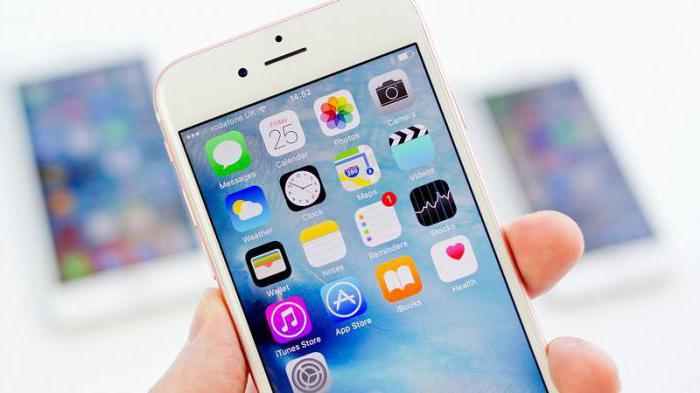
Before you can make contactless payments, you need to set up the possibility of making them. And it depends on the device. Firstly, it must support NFC technology (this is checked in the wireless network settings), and secondly, you need an application to set up payment. Which also depends on the device. Most Popular Apps:
- Android Pay,
- Samsung Pay,
- MiPay,
- Apple Pay.
Android
How to set up contactless payment on your phone
To pay for purchases via phone without a card, you must first activate the near-radio radio. To do this, just go to your phone’s settings and enable NFC in the “Wireless networks” section (if it is not there, then the gadget does not support contactless payment).
As a rule, contactless payments are implemented in all modern smartphones. Checking if the gadget supports this technology is easy. There must be an NFC symbol on the case or battery, and the presence of this chip can be checked in the settings in the “Wireless Networks” tab.
To use all the payment options with one touch, it is necessary that the Secure Element with full access is installed in the mobile phone along with the NFC chip. Only certain models of Phillips, Sony and HTC have it – the necessary application is already installed in them or will be installed when updating the operating system.
Application to pay by phone
To pay with a mobile phone with one touch, you need to install one of the applications. Their choice is large:
- Yandex. Money. After installation, you need to go to “Contactless payments”, where a virtual MasterCard card will immediately appear. A security code will be sent to the phone, which will be needed to write off more than 1,000 rubles. or cash withdrawals.
- Visa QIWI Wallet. You need to link the wallet to the phone by entering the password from SMS. For purchases under Rs. it is enough to unlock the screen of the smartphone, for larger purchases – to enter a PIN code.
- Purse. This is the official application of Sberbank, which is available for download on Google Play. For correct operation, you need to have an Android OS version of at least 4.4.
- Samsung Pay. It is installed on Samsung phones and allows you to make not only contactless payments, but also pay at all terminals that accept cards with a magnetic stripe.
- Android Pay. The application is designed for Android phones. Allows you to make purchases on the Internet and pay with one touch in regular stores and restaurants. Available for download on Google Play.
- Apple Pay. The service is integrated into Wallet and is designed for iPhone owners. With it, you can pay on the Internet and through terminals that support contactless payment.
After installing the application, it remains to link the card – and in the future you can pay only with your smartphone, without carrying a credit card with you.
What phones can be used to pay in stores
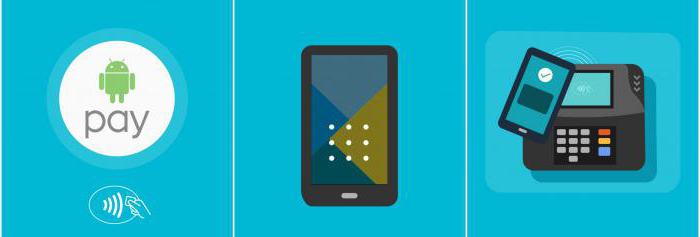
Now the technology is supported by most modern smartphones. The exception is budget options, but even among them there are models with the ability to turn them into a “purse”. So, in order to understand whether it is possible to use a mobile phone as a payment device, you need to make sure that it meets the following requirements:
- Android OS version 5.0;
- installed NFC module;
- a smartphone must be an original model in order to pass the verification of Google services, fakes are not capable of this;
- Root rights must not be enabled.
You can check the availability of NFC support for Android smartphones by downloading the NFC Check app via Google Play. It allows you to automatically check for the presence of the required module. If NFC is available, in the settings, in the wireless networks section, you can find an item that allows you to enable or disable the module.
Alternatively, the user manual always mentions all the functions of the device, as well as its equipment. Apple smartphones are always equipped with contactless payment systems, so the user will pay in the store only by downloading the appropriate application to get started.
Here we will consider the most popular way to use NFC – card emulation. Using emulation, you can create a virtual duplicate of the card and pay from your phone, as if from MasterCard PayPass or Visa Paywave cards, which are simply applied to the terminal to debit funds.
Security
Increased security is guaranteed by payment confirmation using a PIN code, Touch ID or a pattern (for Android). Since a mandatory requirement of any application is to enable the screen lock mode, it will not be easy to steal data. To make a transfer, a special one-time code is generated, the possession of which will not help fraudsters in any way, since all operations are completed within a couple of seconds.
https://www.youtube.com/watch?v=M_BZr37pjAg
Access to such applications is protected by a special password that only the user should know. Because of this, even if the smartphone is lost, there will be time to block it. There is no need to be afraid that, due to software problems, the payment will be made twice – after the first payment, the device automatically turns off, which guarantees the safety of the user’s money.