 NFC Expert
 Instead of conclusion
NFC technology takes the next step in the transition to a smart home.
Surrounding ourselves with many tags, we will greatly simplify the routine, daily operations, such as setting an alarm or setting the smartphone to silent mode in a meeting.
Experiment and find your own ways to use labels.
NFC stands for Near Field Communication or “near contactless communication”, if in Russian. At its core, this is a small chip that can be embedded in a smartphone in order to transfer data over very short distances at a very meager speed. N FC is very close to the RFID technology that has long been used to tag products in supermarkets, but is based on its more recent ISO/IEC 14443 standard (smart cards) and is designed to be used in portable electronics (read: smartphones) and perform secure transactions (read: payment for purchases).
As with the ISO/IEC 14443 standard, the NFC range is only 5-10 cm, but the difference is that the NFC chip is able to perform the function of a tag and a reader at the same time. In other words, an NFC-equipped smartphone can be both a smart card (a metro card, for example), which is enough to bring it to the reader to pay, and the reader itself, which can be used, for example, to transfer funds between smartphone cards and turn real cards with ISO/IEC 14443 support to virtual.
But this is only “one of” and the most obvious use of NFC. Due to the fact that the NFC chip is capable of transmitting data in both directions and does not require device authentication, it can be used as a simple and more convenient replacement for Bluetooth. With the help of NFC, for example, you can share links, passwords, contact and other data between smartphones by simply bringing them to each other.
Introduced in Android 4.0, Beam technology further pushes the limits of NFC, allowing you to quickly transfer entire files and folders between devices, which is achieved by pre-authenticating Bluetooth devices via NFC and then establishing a Bluetooth connection and sending files.
Another possibility is the use of passive NFC tags. These tags, in the form of small stickers, can be purchased for half a dollar apiece and reprogrammed using a smartphone. Each of them can hold 137 bytes of information (in the case of the most common and cheapest Mifire Ultralight C tag), which, again, can be read simply by bringing a smartphone.

You can write the password from your home Wi-Fi into the tag and stick it on the router. Or a code word that the smartphone will respond to. You can organize the automatic launch of the navigator when you install a smartphone in the holder in the car or turn on silent and energy-saving modes when the phone is on the bedside table. A small shopping list of 137 bytes will also fit perfectly.
In this article, we will talk about all the possible applications of NFC in practice, but since in our country payment for purchases with its help has been introduced almost nowhere, we will mainly talk about label-based automation.
Programming NFC tags
There are quite a few examples of use for an NFC tag, the main thing is to be able to correctly set commands:
- NFC-tag for payment is used in shops and supermarkets.
- By placing a tag on the charger in the car, get wireless charging.
- You can program your device to automatically connect to an access point.
- By sticking the chip on the surface of the bedside table and giving the right command, you can set the alarm, change the ringtone and adjust the backlight intensity.
- Forget about urgent tasks? Attach the chip to the diary – the phone will show a to-do list for the current period.
- The car is poorly parked and obstructs the passage – the owner’s phone will receive a notification in the form of an SMS message.
- Set the tag with the intercom code and no more need to enter the code manually.
The use of such labels makes everyday life easier, automates the usual processes.
In fact, there are a lot of scenarios for using tags. For example, I use tags to store passwords and home automation, someone to automatically unlock a smartphone and automatically launch a navigator in a car. Tags can be glued on a table, on a laptop, on a key chain, inside a book, on a business card, or sewn under clothes. Therefore, the range of their application is huge, and in the end everything depends only on your imagination.
Now that we got the tags and pasted them around the house, it’s time to add some magic – program NFC tags for any action. To do this, we do not need a special programmer or test stand.
Let’s start:
- Install the TagWriter program from the Play Market – the official application from the NXP manufacturing company. It is completely free.
- Select the item: Create, write and store.
- Next item: New.
- Now select the record type. This can be plain text, a phone number, an Internet link, an application launch, or data for a Bluetooth connection. There are others, but the ones listed above are the most common. Just a text will do for the test.
- We type any text.
- Press Next.
- Now we have reached the additional options screen. Here you can select an application to launch after reading this label; set protection to overwrite this tag by another device. There will also be information about chip models that can accommodate our message.
- Press Next.
- Now let’s bring the smartphone to the mark.
- Congratulations! You have just flashed your first NFC tag.
Where can I buy a tag?
Additional chips are sold in specialized computer stores. It also makes purchases online. The popular online shopping service AliExpress offers a set of 10 chips worth 220 rubles. The operation of the modules is not affected by the manufacturer, since the same protocol is used.
Writing data
We will use NFC TagWriter to write data. Using the application is quite simple. We start, tap on the Create, write and store item, select New, then select the type of data to be written. The most useful types are contact, plain text, phone number, Bluetooth connection data, URI, and application. There is even a web browser bookmark and an email message in the list, but what they are for is not entirely clear.
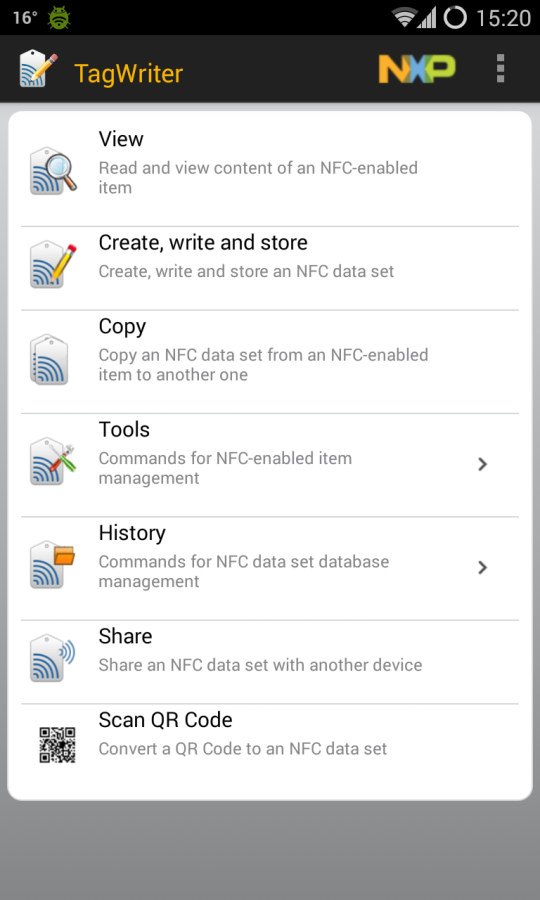
Next, fill in the required fields (for example, the website address in the case of a URI), click Next and get to the options screen (screenshot “NFC TagWriter: message options”). Here you can specify the application that will be launched after reading the label (Add launch application) and set protection to be overwritten by a third-party device (Apply Soft Protection).
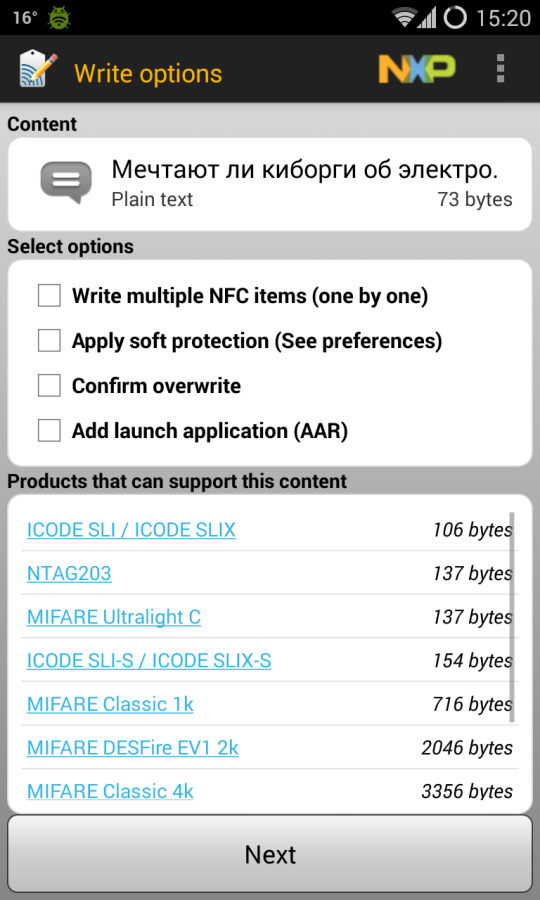
Press Next again and bring the smartphone to the tag. Voila, our data is in it. Now they can be read by any smartphone with NFC support. But what does it ultimately give?
How to record a mark?
Programming of NFC tags on devices with the Android operating system is carried out through free applications in the Play Market. To create tags, developers have released special applications TagWriter, Trigger (NFC Task Launcher), NFC Tools, RFID NFC Tool and others.
We will show how to create tags using the TagWriter utility as an example. It should be noted that one chip can read commands from different gadgets. First, activate the NFC mode on the device you are going to use (phone or tablet).
Install the application from the Play Market and open. Select “Create and write” to set a new label. A screen with two tabs will open.
The “History” tab contains information about the set markers, so select “New” to create a team. The next tab will show the formats available for encoding.
Here, click the URL and then select “Create new bookmark”. Enter the information and click “Next”. Now hold the phone over the chip so that the label is saved.
The message “Store Successful” will appear on the screen. After that, press “Done” – the label is programmed. To keep your smartphone safe in public places, lock it.
How it works
In short, just like passive RFID chips, NFC uses:
- antenna;
- safety block.
The antenna transmits information between the tag and the reader.
The microchips inside the NFC tag are also powered by the antenna.
The security block consists of a set of chips, some of which store user data, and the other deals with signal decoding, reading and writing information.
The security block can be either a physical device – specific chips on an NFC tag, or emulated by software, as is the case with PDA – smartphones, PDAs, smart watches and other portable devices.
In general, the device resembles a microcomputer – it even has its own processor and RAM.

Due to its design, the NFC tag does not require power, is cheap and allows you to reprogram yourself for different tasks. But there is a limitation – to organize data exchange, you need at least one active NFC controller.
How to use?
It’s time to put the acquired knowledge into practice! Below you will find some ideas on how you can apply this modern technology.
- Share your contacts – for example: attach a tag to the windshield, now, if the car interferes with the exit, you can send an SMS or call.
- Do-it-yourself digital business card – we glue our label to a regular business card, now our business partners can transfer our contact to the phone’s address book with one touch.
- Home Wi-Fi password. We glue the label on the router and write the password into it using the InstaWifi application. Now your guests can connect to your Wifi router by simply touching the tag.
- Start syncing your smartphone with your home computer. The label can be glued to a laptop or system unit and registered in it to launch an application for data synchronization.
- Send meeting address in Google Maps – no need to write down, transfer text to SMS, just create a place in Google Maps on your phone and write it down on a special tag in the office. Each employee reads it at a convenient time.
- Turn on the hotspot. We glue a label next to the laptop, then install the Trigger application. Let’s add a new task, select NFC as a trigger, leave the selection of restrictions by default, select “Wireless and local networks -{amp}gt; Wifi zone”, and on the last screen we bring it to the NFC tag. As a result, if you go outside of your Wifi router with your laptop, then touch the label and your smartphone will switch to access point mode, and the laptop will continue to access the Internet.
- Activate night mode. TagWriter is configured to enable silent mode. Now, as soon as you bring your smartphone to this label, notification sounds will turn off and nothing will disturb your sleep. And make one more mark to turn off the silent mode so that in the morning your smartphone returns to its original state.
- Automate your car. Use the tag in the car to turn on Bluetooth, 3G, launch the player or GPS navigator. Now you
- NFC-enabled devices are gradually appearing on the market – stereos, TVs that allow you to pair with a phone or tablet for remote control.
- In the field of inventory management, NDEF records can be used to store information about the place of departure of goods, their passage through various intermediate points, and the like.
- Lighting control. Chip maker NXP has teamed up with smart home specialists EnOcean. At CES 2014, they showed a product that uses NFC to set up and add lighting elements to a home network.
- Locks that use NFC cards instead of a key are quite common in the West, but if your office has electronic passes, you can write information from them to Google Pay and use your smartphone. The price of such locks in stores does not exceed $ 200, and combined locks are even cheaper. Tags can be written to the phone, to a special NFC ring, to a key fob – in general, they can be replicated for anyone.
- In the home library. Create a detailed description of each book, and attach a neat NFC tag to the spine. Now you can get information about the book without taking it out of the shelf and without flipping through the description.