 NFC Expert
 Bank card Mir is successfully introduced to the market using contactless payments. With the help of a special NFC module, a mobile application and supported banking data, you can pay for your purchase with one touch. It is enough to bring the phone to the cash terminal, and the transaction will be automatically completed.
How to check the NFC module in the phone
The built-in NFC system allows you to exchange data within a radius of 10 cm. For this, a special chip is installed in the phone, this option is supported by Android Pay version 4.4. and above, Apple Pay, as well as mobile applications of banks. To check the availability of the system in your phone, do the following:
- if the function is built-in, then the name “NFC” or “NFC and payment” is indicated in the menu;
- check the “enable” box, now the option is active.

Photo 1. Connection example in the phone settings “near field communication”
At first glance, the data transmission system resembles Bluetooth and may cause suspicion among users. But the Bluetooth activity distance is 20 cm, and “near field communication” functions in a low radius and only with devices with a similar chip, namely with payment terminals.
Setting up the Mir card via Android Pay
- Go to the downloaded application as an icon on the phone screen and click “Add card”.
- Entering is done independently or by scanning a bank card.
- An SMS code will be sent to the trusted mobile number to confirm verification.
- After approval in the system, the contactless payment function will be active.

Photo 2. How to add a card through a mobile application with personal data
The system allows you to reinforce several cards at the same time, to do this, use the “Add another” option. When shopping for payment, you need to select one of them.
Important: Not all sales and service points fall into the service of this service. Only large shops, cafes, restaurants with a wide service using Pos-terminals.
Setting up the Mir card via Apple Pay
An innovative solution for transferring Mir card payment data, also modified on iPhone, iPad gadgets. To activate the service and reinforce the World card, perform the following actions:
- The Wallet application is used in the iPhone menu.
- For iPads, select Wallet or Apple Pay in the settings.
- In Standard Mode, the user enters the Apple ID security code.
- After verifying the data, the added card will appear in the active menu.

Photo 3. Scanning card data to add to the application list
The Apple operating system is considered one of the most secure, and this is an important factor in making bank transfers. Flagship iPhones with version 6 and above are eligible to manage the NFC service.
Set up via banking application
Large Russian banks have developed their own applications that will help the consumer use the functional NFC payment service with the Mir payment system. Following the example of Sberbank, you can track the general algorithm of actions:
- Open it on the screen, upon request, enter the mobile phone number and IIN.
- Sberbank will send an SMS code, enter it in a special field.
- Next, you need to come up with a personal password and connect NFC.
- On the next page, you need to select “Add card”.
Photo 4. Instructions for reinforcing the Mir card through a banking application
Tip: The new cards of the Mir payment system have an embedded chip that allows you to make payments by touching them to the Pos-terminal.
How to pay for a purchase with a Mir card via NFC

Photo 5. POS sticker showing payment applications
If the desired application is on the sticker, bring the unlocked smartphone to the POS terminal to pay. When prompted, enter your payment password, sign the receipt, or confirm the transaction with a tap of your finger. The payment will be activated and posted.

Photo 6. Sample of payment for a purchase through a Pos-terminal
Answers to current questions
Are there limits on amounts when using the near field communications feature?
Yes. Some places have minimum amount limits for using contactless payments. A limit of up to 1000 rubles is also set, the system may not request a code, more than this amount it is necessary to enter it. On the official websites of companies, you can find reliable information about the limits and terms of payment via wireless communication.
If only the applications of the international companies MasterCard and Visa are indicated in the stickers, will the terminals accept transfers from the Mir card?
Unfortunately not. Today, the national product option is not widely used, but in the future, many outlets will use it. According to the program of the National Bank of Russia, the process of gradual implementation is still underway, by the end of 2020 all stages should be completed.
Reviews
I can say with confidence that the World is at an early stage, so not all payment functions are active. To find where contactless payments are made, you need to search well, and the services are poorly supported. We are waiting for the promised introduction of a full package of options with all innovative technologies.
Alexander Samsonov, 26 years old, Moscow region
I bought a phone with a special NFC chip, I have a Sberbank debit card, I connected it through the Sberbank Pay application, everything works successfully. I consider Sberbank a leading bank in the application of innovative technologies and in service. Modern devices allow you not to carry a wallet with you, a plastic card or a mobile phone is enough.
Olesya Shelkovnikova, 32 years old, Moscow
Why can’t I pay with Mir card via phone?
Mir card details are not stored in the smartphone and are never disclosed when making payments. Instead of a real card number, a specially generated digital code is used – a token.
If Mir Pay does not accept the card, there can be only three reasons:
- You are trying to add a card other than Mir payment system
- Mir Pay is experiencing a failure and refuses to accept the Mir PS card
- The bank that issued your card does not support Mir Pay payment service
How to pay with a Mir card from a smartphone?
How to pay with Mir Pay
Unlock your smartphone and bring it to the terminal, or open the Mir Pay application and select the required card for payment. You will see confirmation of successful payment on the screen.
Why is it impossible to pay with Mir card?
The fact is that during the development, when creating the MIR, the 3D Secure protection technology was not used (MirAccept was introduced instead). It is impossible to pay for purchases without it, and the operation does not take place on most foreign services.
Why doesn’t the Mir card work in Google Pay?
Google is no longer working on connecting maps
Earlier, Apple notified the National Payment Card System (NSPK) that it was suspending support for Mir cards in the Apple Pay payment service, as reported by the NSPK press service.
Why doesn’t contactless card payment work?
If you pay for purchases with plastic, then the problem may lie in the lack of funds in the account, the incompatibility of the payment systems of the credit card and the terminal, blocking by the bank, malfunctions of the reader or damage to the card.
What application is currently working for payment by phone?
Currently, only two systems work for contactless payments in Russia – Samsung Pay and Mir Pay. Both of these applications only support “World” maps and do not allow you to add any others.
Why can’t I pay via World Pay?
Mir Pay payment failed
Oddly enough, most often this happens due to the fact that users lose their default payment method, so you need to re-make Mir Pay the main payment method: Open the smartphone settings. Go to Connect and Sharing and then Contactless Payments.
How to make it possible to pay by phone?
How to set up a payment method for contactless payments:
- Open Google Wallet.
- Select the desired card at the top. If you don’t see it, swipe the screen.
- Check what is written above the card: “Bring the device to the terminal.” With this card you can make contactless payments. “Map not configured.”
Can I pay with a Mir card now?
And where you can still pay with them
This item was updated on 10/18/2022. Mir cards are accepted in Armenia, Belarus, Vietnam, Kazakhstan, Kyrgyzstan, Tajikistan.
Why can’t I pay by phone?
Among other reasons why payment by phone on a bus or other transport does not work, it is worth highlighting: lack of funds, blocking the card by the bank, incompatibility of the reader and the payment system, failures in the application or terminal.
How to set up NFC on the World map?
To add a card, you must:
- open the application installed on your mobile device;
- scan the card with a mobile phone camera, add its data manually or scan NFC;
How can I find out if my phone has NFC?
How to check NFC on Android phone?:
- Open Settings, go to More. If the near communication feature is available, you will see the NFC column, and below Android Beam.
- Check the checkbox to enable, both functions will be enabled at the same time.
How to pay by card from the phone?
The payment procedure consists of several steps:
- Launch the mobile banking application.
- Go to the “Payments”/”Pay” section.
- Select the appropriate menu item: “scan QR code” (in Tinkoff mobile bank) / “Payment by QR code or barcode (in Sberbank Online).
- Confirm the amount and payment by pressing the button in the application.
How to install World Pay on Android?
Open Google Play and enter Mir Pay in the search bar. Click on the Mir Pay icon and go to the details. Click “Install”, wait for the download and open the app.
Is it possible to pay with a Mir card through an iPhone?
On March 24, Apple limited the possibility of contactless payment with Mir payment system cards using iPhone and Apple Watch. New cards could not be added to Apple Pay, and already linked ones stopped working.
Where is it impossible to pay with the Mir card?
Mir cards and other payment systems
The first and most important drawback of the Mir payment system and the corresponding cards is the impossibility of paying abroad. Nowhere, no way. The system is not supported in other countries. In the near future, Mir will start working in the EAEU countries, but now it is supported only by Russia and Armenia.
Why doesn’t the World map work?
The reason for refusing to work with the Russian payment system is fears due to possible sanctions from the West. In particular, the Vietnamese bank BIDV no longer accepts cards of the Russian payment system Mir.
What cards does Google Pay 2022 support?
On March 10, 2022, Google Pay stopped working in Russia. Or rather, the application is still available in the Play Market, but it is of no use. Google’s e-wallet only supported MasterCard and VISA cards.
How to pay with Mir app?
How to start using Mir Pay:
- Install the application Open Google Play and enter Mir Pay in the search bar
- Register in the application and click the “Add card” button
- Scan the Mir payment system card or enter the data manually
- Enter the code from the SMS message and that’s it, your card is ready to use
When will the World support Google Pay?
Banks will start connecting the cards of the Russian payment system “Mir” to the Google Pay service from October 26.
What is NFC in a mobile phone?
Near Field Communication is a technology for wireless data transmission at a distance of about 10 cm. Using NFC, you can exchange data between two nearby devices without an Internet connection. It can be, for example: contactless payment is the most requested NFC feature.
What is the difference between a Mir card and a Sberbank visa?
How does Mir differ from Visa and Mastercard
Visa and Mastercard are international payment systems, and Mir is Russian. Although since 2015, payments within Russia with all bank cards, including Visa and Mastercard, have been processed through the NSPK, foreign payment systems may limit the service of their cards.
Which cards do not support contactless payment?
Since March 10, the payment services Apple Pay, Google Pay, Samsung Pay, Sber Pay and others have stopped working with Russian Visa and Mastercard cards. For some users, contactless payment is still available, but most likely it is only a matter of time.
How to link a bank card to an NFC phone?
How to link a card to an NFC phone:
- Activate short range radio.
- Launch the mobile application.
- Enter the data that the application will request.
- Bank check.
- The entered data becomes a virtual copy of the real data.
How to pay using Sberbank phone?
How to pay with SberPay when launched from the terminal:
- Bring your smartphone to the terminal to launch SberPay.
- Confirm the operation with your fingerprint or screen unlock code
- View transaction information or check the card balance directly on the smartphone screen
What cards does Google Pay not accept?
The main reason why the card is not accepted in Google Pay is currently related to sanctions. Indeed, on March 6, 2022, the United States blocked Visa and Mastercard in Russia, and the payment service supported these particular payment systems.
How to bypass Google Pay blocking?
How to bypass blocking
Go to the Google Pay website. If you have multiple accounts, select the one you used to buy apps from at the top right. Click on the “≡” menu at the top left and go to “Settings”. Scroll to “Payments profile” and change the item “Country/Region” by clicking on the pencil.
What can I do to make contactless payment work?
You can pay with your phone at stores that accept contactless payments. How to enable NFC (Near Field Communication):
- Open the Settings app on your phone.
- Select Connected devices NFC connection settings.
- Turn on Use NFC.
How to pay for purchases from a phone without NFC?
Now, to pay for a purchase, you can scan a QR code with your smartphone, which will appear on the screen of the PrivatBank POS-terminal after the cashier enters the payment amount. For this, any smartphone with the Privat24 application is enough. After scanning the code, the client needs to select a card in the application and confirm the payment.
What kind of contactless payment is currently working?
Payment using Mir Pay is accepted at any terminals that accept contactless Mir cards. Now there are more than 40 banks on the list, including large banks: Sberbank, Tinkoff, Post Bank, VTB, Alfa-Bank and others.
Is it possible to link the World card to NFC?
Sberbank Mir cards can now be added to pay from a smartphone via NFC. Sberbank’s contactless payment service SberPay began to support Mir cards. You can pay with it at any outlets. The innovation is available to users of Android smartphones with NFC support, as well as devices with the Huawei system.
How to connect World Pay on Android?
Why isn’t the map added to World of Pay? The reasons can be reduced to the following: the bank that issued the cards did not partner with the system, Visa and MasterCard were disabled, the time does not match the location. In addition, there may be problems with settings, as well as difficulties due to full data memory and cache. And of course, no one has canceled the failures that literally happen to ALL systems. But what about users who do not have a card added to Pay World? Let’s analyze in detail.
Reasons and solution
There are many options for errors that a Mir Pay user can see when trying to connect a card in the application. Most often recently, notifications like:
- Client registration is not possible;
- Error while working with client data;
- Waiting for card activation;
- To work correctly, you must verify your Google account or Allow the application to receive an E-mail address;
- Unable to connect, etc.


- In addition, Visa and MasterCard payment systems have been blocked in Russia since March 2023. Accordingly, they can no longer be used. But this is not an answer to the question why the World map is not tied to World Pay, so let’s move on;
- Don’t forget that the card has an expiration date. And now, if it has come to an end, it will not work to use it, well, add it too. There really is a plus here, many banks automatically extend the validity of the product without reissuing, but the same Sberbank is still silent;

- If everything is in order with the plastic itself, carefully check whether you have entered all the data correctly.
- Update the app if there is a new version;
- In the system settings, try deleting all data and software cache and restart your phone. This step helps solve many problems. In particular, technical support recommends it if the Mir Pei error “Waiting for card activation” is on and nothing changes for a long time;


By the way, users note that the connection via mobile Internet is more stable. But over WiFi, an internal error often occurs.
- And again we return to the settings. This time we will be interested in account settings. Your email address must be entered here. Especially often the error “Allow the application to receive an email address” pops up on Xiaomi;
- But if you have an error World Pay “No cards available for payment”, it is recommended to change the energy saving settings. This instruction is especially relevant for Android. In the “Energy saving” section, find the “Application optimization” subsection. From there, remove the software and reinstall it;

- Another popular problem with Mir Pei is “Internal error when adding a card”. Initially, she appeared in the first days as soon as Visa and MasterCard were blocked. Now users rarely see it and it is associated with other reasons. In addition to the solutions already described above, there are also those related to limiting circulation limits. Try to wait a bit before you start bombarding the service with requests again. And if that doesn’t work, try changing your profile. Sometimes it works.
- There are even more banal problems, such as situations when the confirmation code does not arrive. As a rule, this is a problem on the part of the bank. Please wait a bit and try again. If the code has not arrived, contact the bank;
- If nothing helps at all, and the user has no choice but to complain “I can’t register a card” in World Pay, then the most extreme option remains. Try doing a factory reset. Often this solves all problems in general. And not only with contactless payment.

And remember. That sometimes a card is not registered in World Pay simply due to failures or technical work. Then all you can do is wait and nothing else.
What cards work?
Let’s return to one of the main points where the problem arises. And after March 2023, this is just a stumbling block for all payment systems that do not add plastic. So, what cards does World Pay support? At the moment, the system works ONLY with MIR plastic. And to the question: is it possible to add a Visa card to World Pay, unfortunately, the answer is now negative and you should not be surprised that it is not added. Visa and MasterCard are now blocked in Russia and it will not work to pay with them through the application, and it does not matter if it is Sberbank, PSB or Alfa.

But in addition to payment systems, there are restrictions on the banks with which the application works. Therefore, let’s move on to the next question about World Pay, what cards does it work with and is it possible to add another plastic for payment to the program? The payment system works with as many as 85 banks. Among which there are also very large companies.
- Sberbank
- VTB
- Tinkoff
- Alpha
- Russian Post
- PSB
- UralSib
- MTS and many, many others.
In order to view the current list of banks that work with Mir Pay, go to the official website of the payment system. By the way, you can immediately order a virtual card, with which there will be no problems and it will definitely be added to the system.

True, while such a service is offered by MTS, RNCB and VTB. But you definitely won’t miss and won’t worry about which cards can be linked to World Pay. This plastic will definitely be added to the service.
How to link a card?
If you figured out which cards can be added to the World of Pay, then it’s time to tie plastic. Make it simple. A credit card is added to the payment system like this:

- Log in with your Google or Huawei account.
- Scan or enter card details manually.

If everything went well, you can go to the store and pay there by phone. If there are problems and the World card does not connect to World Pay, return to the very first section in the content.
If you have gone through all the steps, the software is installed, the card is added, it’s time to try out the option. To pay for purchases through the service, unlock your mobile device and bring it to the terminal. If the system asks for a PIN, enter it. In some cases, it is enough to use Face or Touch ID, depending on the capabilities of the mobile device.
So. We have dealt with all the options, what to do if the card is not added to the payment system? Try everything and check the performance step by step. Share your solutions to problems in the comments.
If World Pei is not working, please try to solve the problem yourself. To do this, make sure that NFC is enabled, update the application (or rather reinstall it) and check that the settings are correct. In particular, you must make the MirPay application the main payment method, allow the use of mobile Internet traffic, and set the time on your phone as accurately as possible. Also, remember that from March 2023 there are additional restrictions on payment systems operating in Russia. And if your card does not meet the conditions, then you will not be able to use it. There are many other points that you need to pay attention to if World Pay does not work on your phone. Let’s deal with them.
Causes and solutions
There are a lot of options for problems when World Pay does not work on the phone. As a rule, a short message about the difficulties encountered is displayed on the screen.
- Card not supported/not supported;
- Sorry, an internal error has occurred Mir Pei;
- Showing details is temporarily unavailable;
- To continue registration, allow the application to receive your email address;
- Error while working with client data;
- Stuck waiting for activation;
- Registration is not possible;
- The service is temporarily unavailable, there are no available cards for payment;
- SMS does not come when registering a card;
- Unable to save connection;
- The card is not readable;
- Confirm account;
- The app keeps crashing.
And these are only the most common problems. We will talk about them further, especially since the solution is often universal and should successfully solve other difficulties. So, World Pay does not work on the phone, why is this happening and what should I do?
Card not supported
Since March 2023, the most common reason why Mir Pay does not work is incompatibility with the card. There are a number of conditions that must be met in order to use the application.
- The payment system now works ONLY with MIR cards. Due to sanctions, adding Visa or Mastercard plastic to the application or using it will not work.
- In addition, MirPay does not work with all banks. The full list of partners is on the official website of the service.
If the card satisfies all the conditions, but the system continues to insist that it does not fit, contact the technical support of the service.
Internal error
Another common problem for system users is manifested by the notification “Sorry, an internal error has occurred in World Pay”.

At first, after the sanctions began, this error was associated with the influx of new users, when the system simply could not cope with the flow. Now, to solve the problem, it is recommended to delete the cache and application data in the phone settings, restart the phone and try to link the card again.
In addition, many users note that the internal error went away if they switched from Wi-Fi to mobile Internet.
If these steps did not help, try to wait a bit and, if possible, change the profile on your phone to reset the number of hits.
Unable to connect
And another common problem with Mir Pay is “Unable to establish a connection”. And it occurs not only when the mobile device is not connected to the network. To solve the problem, follow this algorithm:

- If Google Devices is installed on your smartphone, delete them;
- Allow Mir Pay to use mobile Internet traffic and disconnect from Wi-Fi;
- Reboot the device and check if the error in World Pay “No internet connection” has disappeared.

If the Mir Pei app says “No internet connection” again, make sure that the network connection is generally active. Did you forget to replenish the balance? Is there free traffic? Perhaps the software does not work for this reason.
Registration is not possible
In order to remove the notification, go to the phone settings and in the “Date and time” section, allow the network time to be used. After that, it is recommended that you clear the cache and application data. And you can proceed to add a map.

The service is temporarily unavailable, there are no available cards for payment
If the Mir Pei notification “Service is temporarily unavailable” appears, what should the client do? As a rule, such an error does not appear from the first day of use. To solve the problem, it is recommended to study the power settings. This item may be called differently depending on the device and the specific model (energy saving, battery consumption, etc.). Whatever it is called specifically for you, you need to find the “Application Optimization” item and remove MirPay from there. And then restart your phone.
Also, make sure your mobile device is connected to the network.
Details not available
Sberbank clients encountered the error “Show details is temporarily unavailable”. There were no mass appeals about other banks in the network. And since this problem is not the responsibility of MirPay developers, for a solution you need to contact Sber technical support.
Allow access to email
If one version of the problem, when World Pay does not work on the phone, is accompanied by the text “To continue registration, allow the application to receive your email address.” As a rule, it occurs on Huawei smartphones. To solve it, you must specify your email address in your account settings. Save your changes and try using the app again.
Error while working with client data
An error when working with client data is easily removed if you disconnect from the WiFi network and allow the application to use mobile traffic.

After that, go to phone settings and delete MirPay cache and data. Be sure to set the payment system as the main payment method.
And if you have Google Services installed, demolish it without regret. And don’t forget to install the latest app update. Now you can run the software and perform a health check.
Stuck waiting for activation
Many users have been complaining in recent months that the software freezes while waiting for activation. Of course, this is largely due to the increased flow of new users who, in the conditions of blocking other systems in Russia, were looking for a replacement. However, you can try to speed up the process. To do this, in the phone settings in the application manager, find MirPay and delete the cache and all data. After that, return to the program and try to add the card to the system again.
I don’t receive SMS when registering
In a situation where SMS is not received when registering a card, there is no fault of the developer. Check if the phone’s memory is full and contact the bank’s technical support.
The card is not readable
If, when paying, the terminal says that the card is not readable, check in the settings that World Pay is specified as the main payment system. Sometimes that’s why it doesn’t work. But if the error persists, then most likely the problem is either in the terminal or in the payment chip in the phone.

App keeps crashing
Another problem faced by thousands of Android phone users. On their mobile devices, the payment system simply crashes when accessing it and, accordingly, does not work. Software developers reported that the software stopped working after one of the latest updates. And advised to wait for the release of the new version.
Nothing helps
If you have tried all the options, but the World Pay application still does not work on your phone, use a factory reset on your smartphone. Or write to the technical support of the payment system. They respond actively (even on social media! verified).

Sanctions
And finally, the most important question that worries many since March 2023: Will Mir Pay work under sanctions? Yes, it will. But with a number of limitations. Firstly, only Mir cards can be linked, Visa and Mastercard do not work in the system anymore. And secondly, the system is accepted by a very small number of countries abroad.
What to replace?
All these massive situations when the Mir Pay application does not work on the phone forced users to look for a replacement payment system. Finding it in the current conditions is not so easy.

SberPay for Mir cards is not available yet. Bank employees promise to add this payment system to the list of supported ones in the near future, but at this stage the financial institution works only with MasterCard and VISA. In this case, only the “plastic” of Sberbank is allowed to be added. Cards of other financial institutions cannot be used. Below we will consider in detail what this is due to, and what to expect in the future.
Is it possible to connect the Mir card to SberPay
At the beginning of July 2023, there was news about the launch of their own payment system Sber Pay, which was supposed to replace or partially crowd out the main competitors, such as GPay or Apple Pay. The new system allows you to pay via the Internet or offline – at retail outlets where terminals are installed and contactless payments are provided.
Many users hoped that the Mir card would work in Sberbank Pay, but as of March 2023, this option is not available. Representatives of the financial institution claim that they plan to add support for the payment system in the future, but this is not yet the case. At the same time, no one can name the exact dates when the Mir card from Sberbank will be added to Sber Pay. Work in this direction is underway, but when the results will be achieved, they do not say.
At this stage, as an alternative, you can use Samsung Pay, a service that allows you to bind Mir plastic, and then pay with it in any offline stores where there is a contactless payment terminal. To bind, it is enough to install the application, scan the payment instrument or enter its data manually.

Absence of the Mir card in SberPay from Sberbank can be replaced by another payment system created exclusively for new cards. We are talking about “plastic” called Mir Pay. This is an analogue of existing applications for contactless payment. It provides the necessary security of transactions and will allow you to bind any “plastic” of the payment system.

The process of adding “plastic” The world goes through several stages: opening the application, scanning the map and following the prompts on the screen. After that, you can activate the application, enable NFC and make payments using the Mir card according to the Sberbank Pay principle. Perhaps the presence of such an application is one of the reasons why Sberbank is in no hurry to add this system to the list of available ones.
What cards can be added to Sberbank Pay
At the initial stage, only VISA worked in Sber Pay, but MasterCard was also added over time. So far, only these services are available, but, according to representatives of the financial institution, in the near future it will be possible to connect Mir to Sberbank Pay. No one names the exact date, but there is a clear intention to realize this plan. The reasons for the delay are hidden in some technical issues that the representatives of the bank do not voice.
It is also worth noting that only “internal” payment instruments issued by Sberbank can be added to SberPay. This is due to the fact that contactless payment does not work through a separate application, but through the Sberbank Online program. It is logical that adding payment instruments of other financial institutions is not available here.

Now you know if SberPay works for Mir cards, and what are the reasons for the delay in adding this payment system. Representatives of the bank promise to resolve this issue in the near future, but no one has yet announced the exact timing. At this stage, the holders of such “plastic” can find a replacement in other similar services, for example, Samsung Pay or World Pay.
In the comments, share how important it is for you to add Mir to SberPay, and when you can expect innovations.
Contactless payment service SberPay, which Sberbank turned off last spring, has finally returned to Russia. Despite the fact that no one really explained to us what was the true reason for blocking NFC payments, it took the bank more than six months to restore the service. All this time, Sber offered only online payment, as well as payments by QR code according to the SBP principle. However, now all bank customers can start paying with their smartphones again using SberPay using the near-field module. It remains only to figure out how to set it up.
SberPay started working again in Russia via NFC
SberPay — download for Android
If you don’t remember, SberPay is the same service for paying for smartphone purchases as Mir Pay. They both emulate bank cards and transmit encrypted payment information to the terminal via NFC. The only difference between them is that Mir Pay supports cards of almost all Russian banks, while SberPay only supports Sberbank.
⚡️SUBSCRIBE TO THE ALIBABA CHEST TELEGRAM CHANNEL AND BUY ONLY THE BEST GOODS FROM ALIEXPRESS
How to set up SberPay on Android
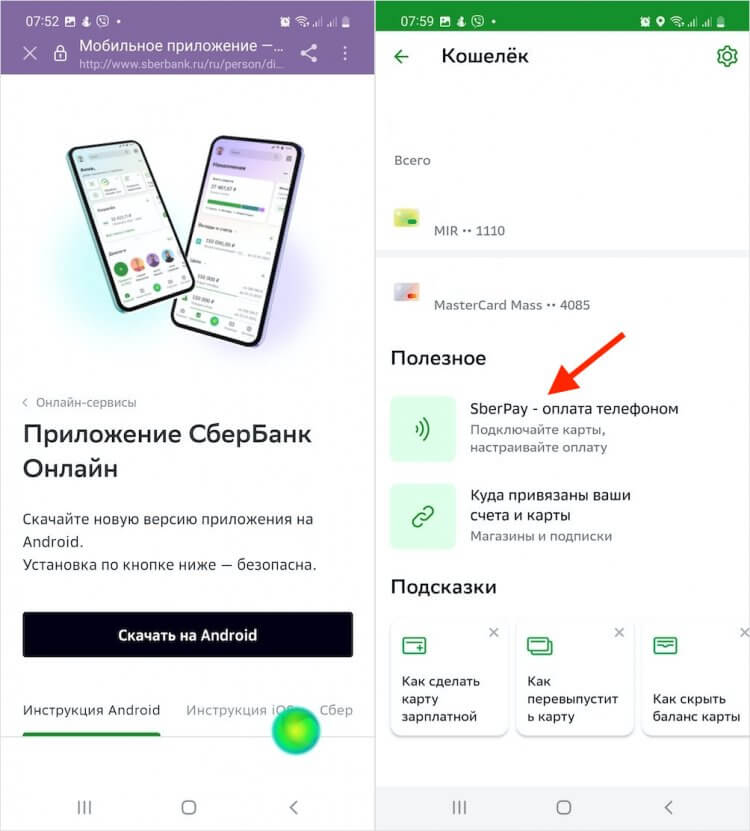
First you need to install the latest update of Sberbank Online
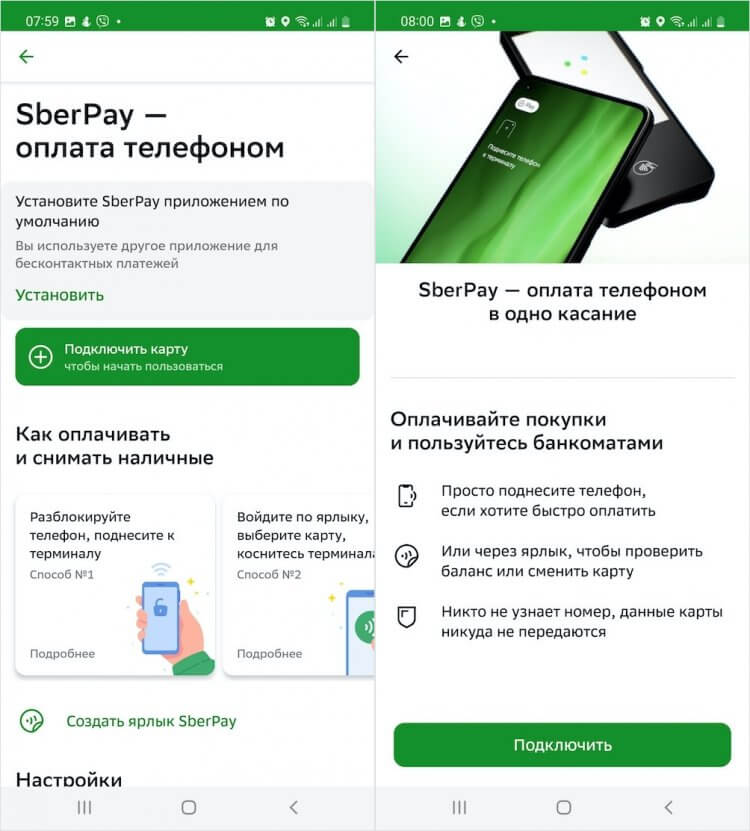
Add a payment card to SberPay
- Click “Connect card” and select the card from which money will be debited;
- Then set SberPay as the default payment method by clicking on the “Install” button.
SberPay does not work. What to do
Important: after updating Sberbank Online, the button “SberPay – pay by phone” may not appear. And without it, setting up a payment service will not work, because it will not be possible to link a card and set SberPay as the default payment method. I did, even though the latest version was installed. It turned out that it was enough to unload the application from memory, and then start it again and everything would work as it should.
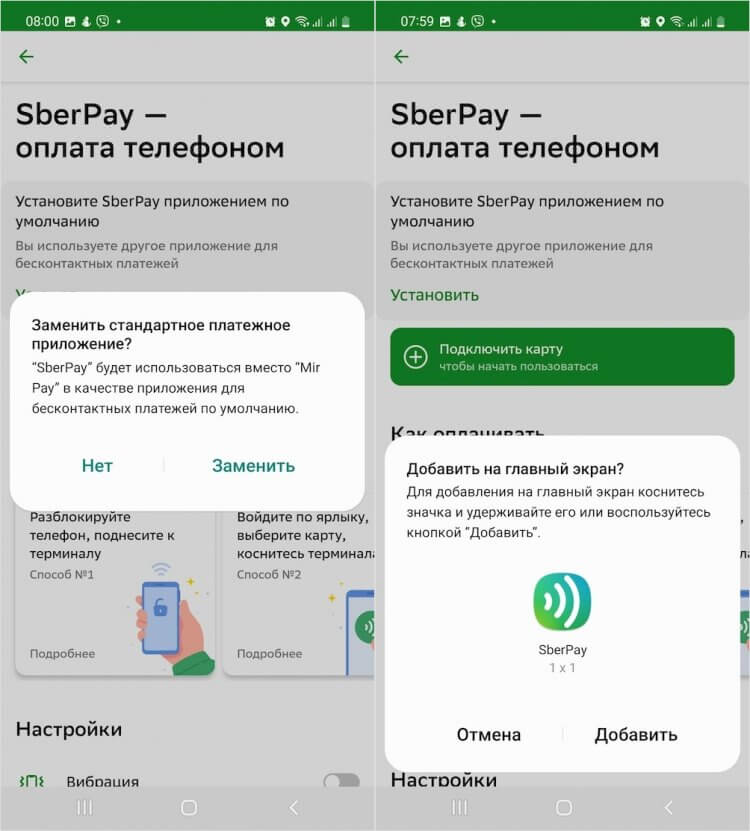
Don’t forget to set SberPay as the default payment method
However, it may be that the card link button appears, but the card that can be linked to SberPay does not. In this case, I recommend making sure that the “plastic” is issued by the Mir payment system, and not some other. Because MasterCard and Visa cards, even if issued by Sberbank itself, are no longer tokenized in Russia and, accordingly, do not work with contactless payment services. Therefore, you will have to issue a World card.
Now you can pay for purchases using SberPay by simply bringing your unlocked smartphone to the terminal at the store’s checkout. He activates the service himself and transmits information about the payment. If the purchase amount is less than 1000 rubles, you will not have to additionally confirm the transaction, and if it is higher, you will need to verify the payment with a password or biometrics.
How to use SberPay
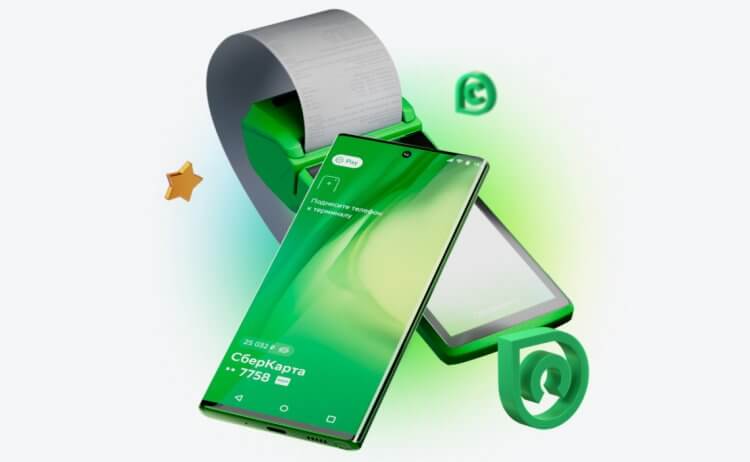
Paying with SberPay is as easy as using Mir Pay
In the new version, Sber developers have added the ability to bring the SberPay shortcut to the smartphone desktop. It will come in handy in two cases:
- First, if you have another contactless payment service installed by default, then by launching the SberPay application, you can pay for the purchase using it without changing the default settings.
- Second, in the SberPay app, you can select the bank card with which you want to pay for the purchase immediately before payment. Previously, for this you had to go to Sberbank Online and link another card.
Despite the fact that SberPay, unlike Mir Pay, allows you to link only a Sberbank card, it is more convenient from a functional point of view. The service works in three modes at once:
- Online payment (where there is a SberPay button);
- Payment by NFC smartphone;
- Payment by QR code at almost any terminals.
Pay by QR code — with cashback
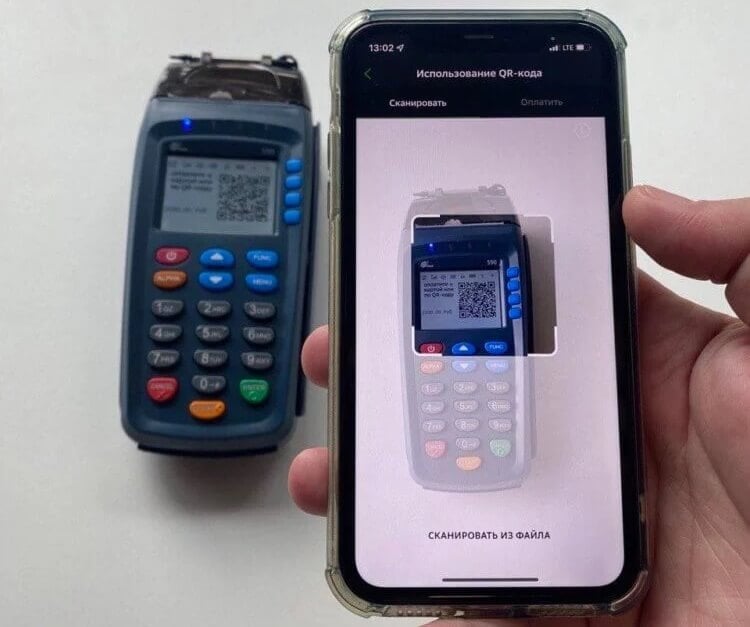
SberPay also allows you to pay by QR with cashback
The last function is especially interesting. By itself, payment by QR code appeared with Sber a long time ago. However, only recently the bank began to introduce the ability to pay in this way on the most common terminals. If the terminal is served by Sberbank or another partner bank, a QR code will appear on its screen, which can be scanned by a smartphone and thus pay for the purchase, for example, from an iPhone.
⚡️SUBSCRIBE TO OUR CHANNEL IN ZEN AND READ THE BEST ARTICLES OF OUR AUTHORS FOR FREE
When paying with SberPay, even if you pay using a QR code, you will still receive cashback. This is a very important aspect, because there is no refund for QR payments through SBP or SBPey, because payments are made on the principle of transfer between accounts. Yes, cashback for paying SberPay is credited not with real rubles, but with “Thank you” bonuses, but this is better than nothing. Moreover, you can pay with them in many stores.
Despite the fact that there has not yet been confirmed information about the blocking of Google Pay in Russia, it is still impossible to completely exclude such a possibility. As recently as last night, Google stopped selling ads in our country, which means that there is a risk of further bidding. Therefore, you need to be prepared for the fact that the contactless payment service of the search giant may also stop working. But this does not mean that the ability to pay for purchases by phone will disappear completely after that. You just need to set up Mir Pay on Android and pay with it.
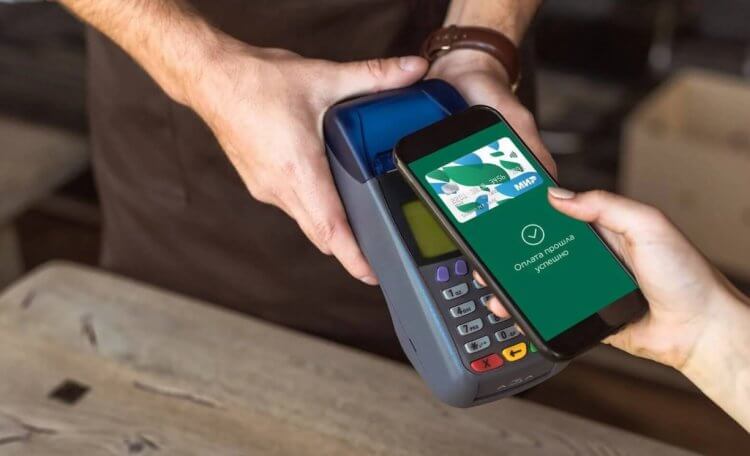
Mir Pay will help you keep the ability to pay with your phone even if Google Pay is disabled
Mir Pay is a Russian contactless payment service for Android developed by the National Payment Card System (NPCS). While Mir Pay doesn’t work on iOS (although local authorities are in talks with Apple to add it to the App Store), it’s still a very versatile service.
How to enable Mir Pay on Android
Mir Pay works with cards of most Russian banks issued under the auspices of the Mir payment system. Therefore, it does not matter whose card you have – Sberbank, Tinkoff Bank or VTB – you can pay for purchases with your smartphone in any case, regardless of the severity of American and European sanctions.
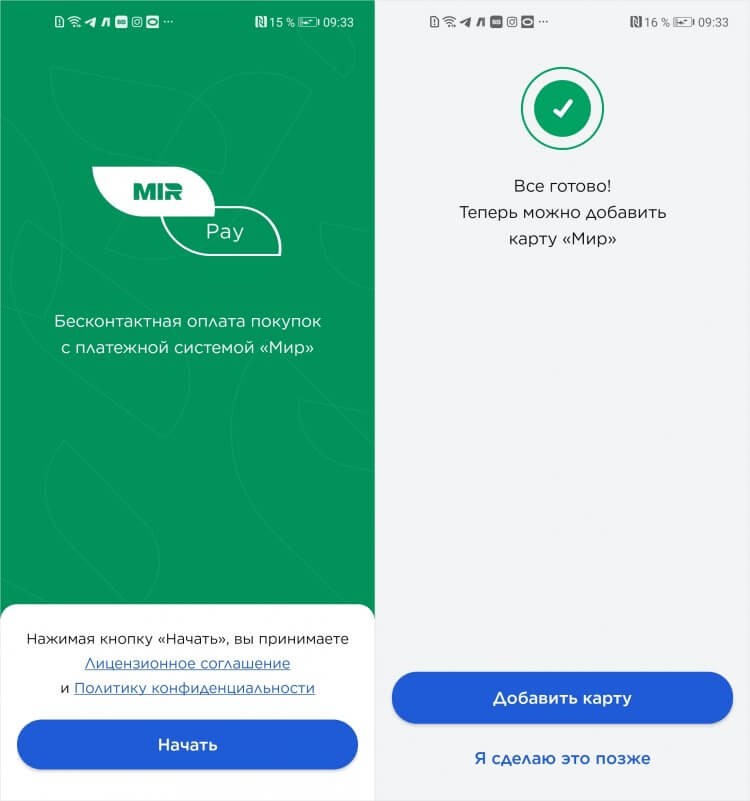
You can add a card of almost any bank to Mir Pay if it is issued under the auspices of Mir
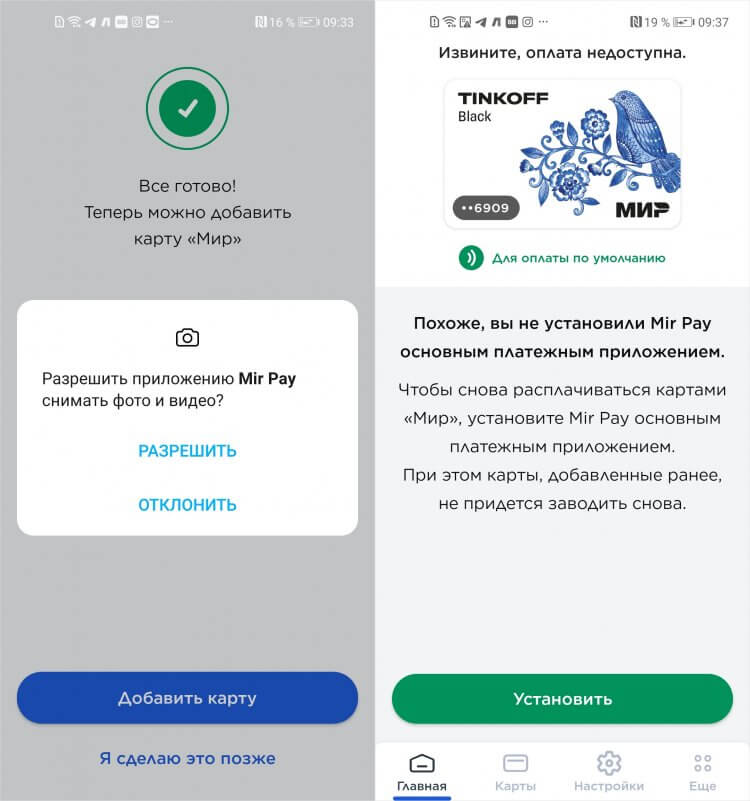
The main thing is not to forget to enable Mir Pay as a default payment method
- Enter the three-digit CVP code located on the back of the card;
- Turn on Mir Pay to pay for purchases by default instead of Google Pay.
Google disables contactless payments for 5 Russian banks. What alternatives does Google Pay have
In principle, nothing complicated. But some users complain about two problems they face when setting up Mir Pay on Android. Here they are:
- Mir Pay writes: you are trying to add a card that is different from the Mir payment system.
- Mir Pay does not work as a default payment method when brought to the terminal.
How manufacturers fool us with charging their smartphones
The first problem, as practice shows, is quite common. It manifests itself in many when adding a card by scanning a contactless module using NFC. I applied the “plastic” to the back of the smartphone three times before Mir Pay accepted the card. I never managed to figure out why this happens, but I have a version.
It lies in the fact that the smartphone simply does not have time to read the card correctly, for example, if you remove it too quickly or simply twirl it, trying to make the NFC work. When I just put the card on the back cover of my device for a few seconds and waited for it to work, everything was recognized without any problems.
How to set up Mir Pay
The second problem is solved no less simply – you just need to enable Mir Pay as a default payment method. This can be done in two ways.
In the app itself:
- Run Mir Pay on your Android smartphone;
- Go to “Settings” at the bottom of the screen;
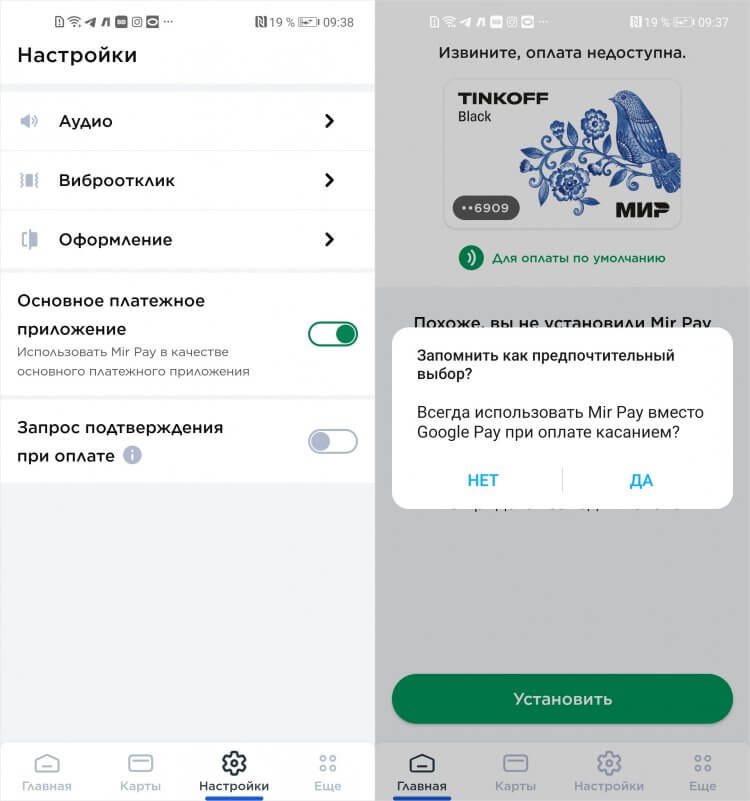
Mir Pay must be selected as the default payment method on Android
- Turn on the “Main payment application”;
- Confirm the change of means of payment.
Should I buy a smartphone right now or wait
In Android settings:
- Go to “Settings” and select “Other Connections”;
- In the window that opens, go to the NFC settings section;
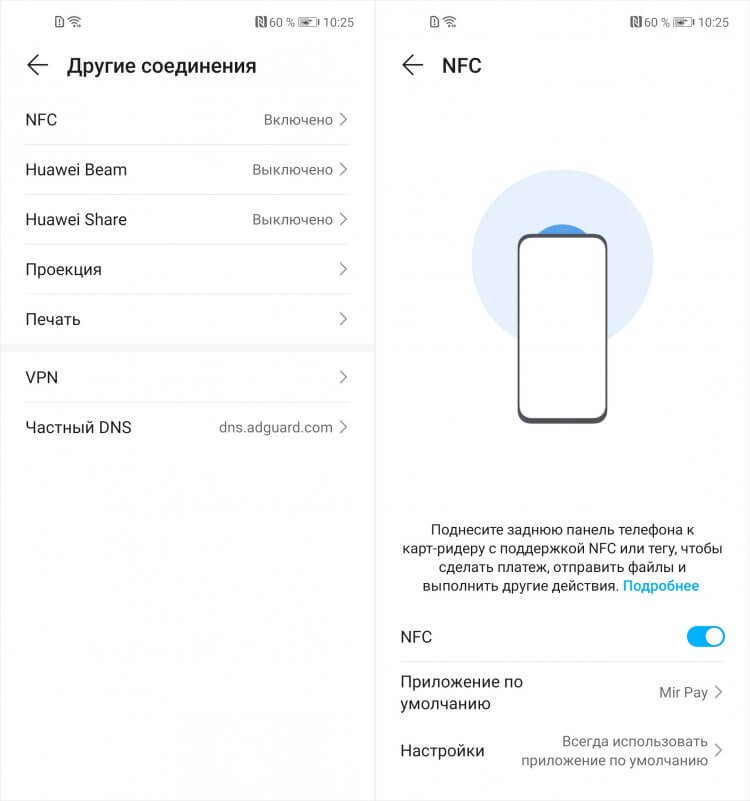
You can replace Google Pay with Mir Pay in the settings
- Find and open the Default Application tab;
- In the drop-down menu, select Mir Pay as a means of payment.
How to pay Mir Pay
Basically, Mir Pay works exactly like Google Pay. To pay for the purchase, you just need to turn on the screen with the power button and attach your smartphone to the terminal at the checkout. At this moment, recognition will take place and Mir Pay will give him a token with payment information. Biometric confirmation is not required. But only for purchases up to 3000 rubles. Google Pay has a maximum amount of 1000 rubles.
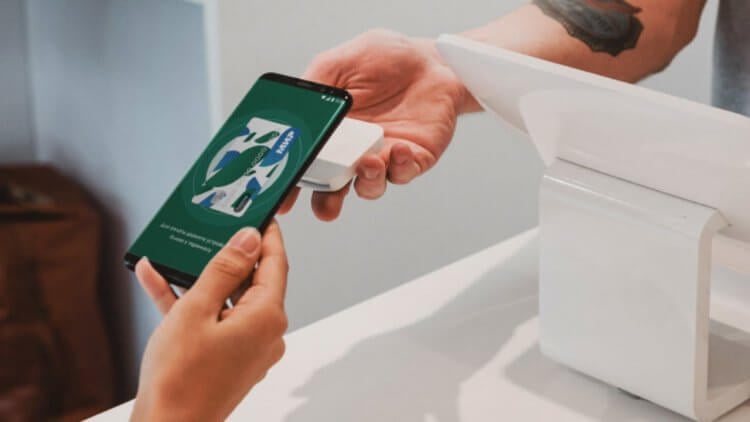
Mir Pay is accepted wherever Mir cards are accepted
Internet is not required to pay for purchases via Mir Pay. That is, in theory, you can pay even if the traffic is over or the tariff, in principle, does not provide access to the Network. However, the number of Mir Pay payment tokens, which allow you to pay, is limited, and in order to replenish them, the smartphone needs to connect to the Internet. Typically, this should happen every 10 transactions. Google Pay is also arranged in the same way, so there is nothing criminal here.
Will Android be disabled in Russia and is it possible to protect yourself from it
It is very convenient that Mir Pay will be accepted wherever payment is made with Mir cards. Even the terminals of sanctioned banks – and there are five of them today: VTB, Otkritie, Novikombank, Sovcombank and Promsvyazbank – will not refuse you a transaction when using Mir Pay. Another thing is that in online stores and online services, the domestic contactless payment service is reluctant to accept. Neither Yandex. Taxi, neither Lamoda, nor any SberMegaMarket Mir Pay support.
Despite the fact that disabling Google Pay in Russia is by no means a pleasant event, users from Russia were not taken by surprise at all. Thanks to the openness of Android, we still have the opportunity to continue paying for purchases by phone using at least two domestic services: SberPay and Mir Pay. Yes, many have relied on Mir Pay because of its versatility, because, unlike SberPay, it allowed you to link cards of any banks. However, turning off the contactless service of Sberbank will definitely not bring anything good to us.
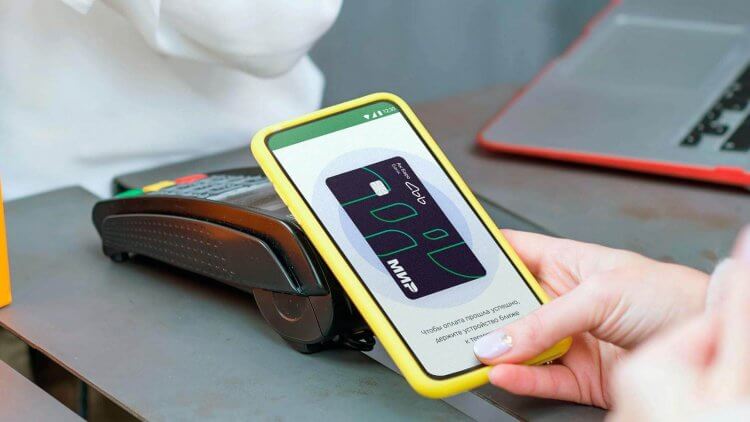
SberPay no longer allows you to link Mir cards and pay with them contactless
❗️READ EXCLUSIVE ARTICLES THAT ARE NOT OUT ON ANDROIDINSIDER. EN
SberPay does not work. What’s up
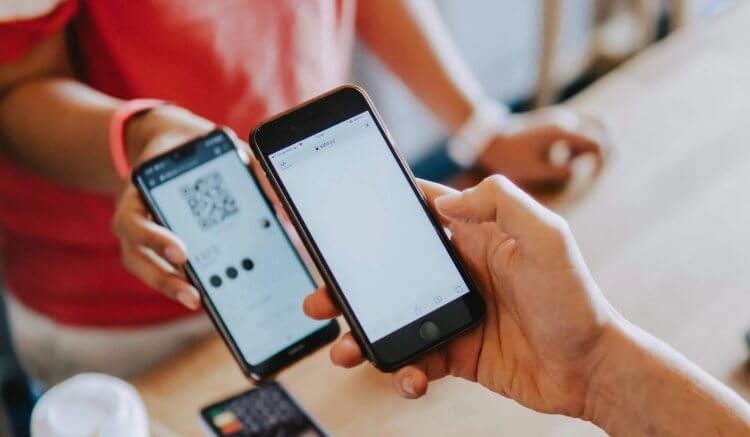
Sber card holders can still pay by phone either via QR or Mir Pay service
Exactly why SberPay does not work with Mir cards is completely unclear. In support, they said that the reason for their disconnection was the decision of a certain technical partner of Sberbank. What kind of partner this is, the bank did not specify. But, according to information from open sources, the tokenization of Mir cards and processing is carried out by the National Payment Card System (NSPK), which is their operator.
Whether the shutdown of Mir cards from SberPay is connected with the conflict between Sberbank and NSPK, no one can say. However, users of the Sberbank contactless payment service are already facing problems. According to them, many people are no longer able to make a SberPay payment if they try to pay for a purchase at a terminal in an offline store, while others cannot link a card to SberPay, even if it was issued by Sberbank itself.
❗️ASK A QUESTION TO ANDROIDINSIDER AUTHORS. EN
However, in any fly in the ointment you can find a little bit of honey:
- First, online payments via SberPay still work without any problems, regardless of the payment system that issued your bank card (Visa, MasterCard, Mir);
- Secondly, it is still possible to pay for purchases without a card from a Sberbank account using the Fast Payment System – what it is and how it works, we have already described in a separate article;
- Thirdly, the disconnection of Mir cards from SberPay is not a permanent phenomenon, that is, after some time Sberbank will find a solution and connect the “plastic” NSPK to its service again.
How to pay with Mir card from phone
At the moment, Sber offers its customers two ways to pay for purchases: via QR through the Fast Payment System and with a plastic card. But since far from all stores and establishments in Russia accept QR payments, it’s better to have physical “plastic” with you. Regardless of the payment system, you are guaranteed to be able to pay for your purchases. Therefore, until the difficulties are corrected, it is recommended not to neglect the carrying of bank cards.
However, if you really cannot live without contactless payments, you still have the opportunity to pay for purchases by phone using Mir Pay. This service is operated by NSPK itself, so it does not matter whose cards you link to it. The service also supports Sber cards, so there will be no problems with debiting funds from Sber accounts.
❗️BUY THE BEST PRODUCTS WITH ALIEXPRESS
Sometimes Mir Pay may experience problems when trying to link a card. In this case, he may refuse to add it and write “you are trying to add a card that is different from the Mir payment system.” However, if you try to repeat the adding procedure several times in a row, the service will still accept it. As a last resort, try deleting the Mir Pay application cache and adding the card again.
- Beginners in Android
- Applications for Android
June 21, 2021, 14:04
It is now possible to connect Mir cards of Sberbank to the mobile payment service developed by the Mir payment system for Android smartphones with NFC support.
You can register in Mir Pay for payment from your smartphone any Mir card of Sberbank, both contact and contactless. To pay for the purchase, it is enough just to unlock the smartphone and bring it to the POS-terminal, it is not necessary to enter the Mir Pay application for this. And to pay for purchases up to 1000 rubles, unlocking the smartphone is not required, you just need to activate the screen.
“Today Mir Pay supports all relevant features of the mobile payment service. Its users have access to fast, convenient and secure payment from a smartphone for purchases and services, as well as payment for travel in transport on all devices that accept payment with Mir contactless bank cards. In the subways of Moscow and St. Petersburg, payment via Mir Pay is currently the most profitable way to pay for travel*,” said Dmitry Buvin, commercial director of the Mir payment system.
“Mir Pay has already become the third solution for Sberbank Mir cardholders who prefer to pay for purchases with their smartphone. In addition to Mir Pay, contactless payments via SberPay and Samsung Pay are available to bank customers. At the same time, each solution provides a special user experience, which allows each user to choose the best one for themselves,” commented Igor Kovalev, Director of the Client Wallet Division of Sberbank.
Protection of payment transactions in Mir Pay is provided in accordance with all international security standards. Mir card details are not stored in the smartphone and are never disclosed when making payments. Instead of a real card number, a specially generated digital code is used – a token.
*The discount for Mir Pay users in the Moscow metro is valid until 06/30/2021, in the St. Petersburg metro – until 12/31/2021.
Popular publications in the media