 NFC Expert
 The history of the emergence of technology in the phone
It is believed that this is a relatively young development. Its appearance dates back to 2004: it was during this period that the three famous companies Nokia, Philipps and Sony organize the NFC Forum, and three years later they integrate the first NFC tags into a Nokia phone.
In everyday life, NFC functions are related to running programs and applications. As a result, technology users are able to:
- instantly launch navigators;
- set up quick access to virtual services;
- turn on a kind of alarm clock, reminding you of important planned actions and affairs;
- speed up the process of launching equipment and programs.
The final appointment depends on the desires and fantasies of the user and has practically no restrictions (within reason and the capabilities of phones).
For payment
The most important function, as mentioned above, is the use of mobile as a convenient payment tool. To pay for purchases in the store, you will need:
- link a bank card to a gadget;
- bring the device to the terminal (as a standard “plastic” with PayPass technology)
- wait for the payment information to be read;
- enter the pin code.
- After that, it remains to pick up the paid goods.
In the house
The use of NFS in the home depends primarily on the user’s imagination. Those wishing to take advantage of the system’s capabilities are able to:
- automatically turn off wi-fi when leaving the apartment;
- launch an application with a notebook in the morning;
- turn off unnecessary options before going to bed;
- turn on the alarm.
The list above is just an example, since the full list of possibilities is much wider. The main condition for using this service will be a connection with the phone, without which it is impossible to program the execution of pre-selected tasks and the launch of utilities and useful services.
device with configured service;
with a label located in the right place (they will be discussed below).

To start or turn off wi-fi, you need to do just a couple of actions:
- bring the cell phone to the mark;
- wait for it to be read;
- after which the device will perform the task provided by the settings.
You won’t have to do anything extra, because the connection to the Internet (or the disabling of traffic distribution) will already happen.
In the office
The process of using appliances in the office is not much different from using appliances in everyday life and at home. The main benefit that office workers can get is the automation of part of the work processes. Thus, employees are able to turn on some of the systems that are important for their activities with the help of NFS tags with one touch. As a result, the time required to activate workflows is saved.
An alternative way to benefit is through the transfer of small files and documents. But it is relevant for employees working in close proximity to each other.
In the car
The most obvious benefit from the presence of NFC tags in vehicles will be the automatic inclusion of navigators on smartphones mentioned above. Drivers and motorists just need to bring the device to the desired point of the car and wait until the system opens the map and builds a suitable route. It is unlikely that such an action will save a lot of time, but it will certainly simplify the life of car owners, saving them from the necessary procedure for launching GPS navigators and giving them the right to use the online service without unnecessary worries.
How to use on smartphone?
Currently, there are 3 main ways to use the technology, so the question of how to use NFC should not be inconvenient. Equipment owners are offered:
- pay with gadgets in stores;
- launch applications and programs using tags;
- transmit information using NFS instead of Bluetooth.
Knowing what NFC is in a smartphone, users should understand that there is no need to worry about the security of personal data or finances. If you do not do stupid things and take the protection of personal information seriously, there will be no trouble. And with an irresponsible attitude, even the most reliable and secure system will not help users.
Pros and cons of paying by phone
Contactless payment is the most popular. Buying goods and then transferring money through a smartphone has a number of important advantages:
- simplicity of the process;
- the ability not to carry a card;
- reliability and security of financial transactions;
- constant availability of a source of funds at hand.
There are no obvious disadvantages of the electronic payment instrument, since all existing weaknesses are also present in standard bank cards.
Checking the device for NFC
Would you like to try the technology in practice, but don’t know if this is possible on your device? Let’s check.
To do this, carefully open the back cover of a smartphone or tablet, in a situation where it can move away without damage and inspect the gadget’s battery.
With the presence of NFC development, you will see this abbreviation there. If the cover of the phone/tablet is not removable, then the corresponding icon or abbreviation will be located on the outside.
If for some reason you do not want or cannot remove the cover, you can make sure that this method of communication is available in the device settings.
Find the “Wireless networks” tab, then “More …” and if NFC is available on the device, then there will definitely be a corresponding item.
NFC activation
If you found it on your device, you must also activate access to NFC technology. You can do it like this:
- go to the “Settings” section and then “Wireless networks”, “More …”, where earlier you could verify the presence of NFC;
- confirm by clicking on the item “Allow data exchange when combining {amp}gt; device name {amp}gt; with another”;
- Android Beam is immediately activated on an Android smartphone. If this does not happen, click on it and select “Yes” so as not to disrupt the system;
Which banks support contactless services?
Having dealt with the benefits of NFC technology in everyday life, you should return to its usual purpose – use as a payment instrument. In order to pay by cellular in stores and pay for services with one touch, several conditions must be met:
- the device must have a special chip;
- the operating system must support the operation of the utility;
- binding of a bank card is obligatory;
- the bank must join the financial system and allow contactless transactions for customers.
Google Pay is the most common version of the mentioned online financial service, which works on devices with the Android operating system. They are closely connected to the Google app store and use all the extensions and additions provided by the digital corporation. At the same time, the payment process does not have obvious differences and important characteristic features, and therefore the main detail that distinguishes it from the general background will be compatibility with the Android platform.
Apple Pay is a full-fledged analogue of the online service from Google, which differs from it only by the manufacturer – Apple Corporation and compatible devices where the utility is used. Similar devices, as indicated by the name of the manufacturer, will be the iPhone and other similar devices. The principle of payment, despite the change of the developer, will remain unchanged. It is enough to attach an iPhone to the terminal and wait for the transfer of financial information.
Samsung Pay is the third type of online financial system that allows you to pay for goods and services in stores. Looking at the name, it is not difficult to guess what its most important distinguishing feature is. Samsung Corporation uses its own developments in the manufactured equipment, which include Samsung Pay.
Microsoft Pay
Not much different from what Google and Microsoft Pay offer. And the most important distinguishing feature is again associated with the manufacturer. The mentioned online system is used on devices where the Windows platform is used as the basis. Naturally, differences in approaches give rise to other distinctive nuances and details that distinguish programs from different developers. But most of the differences are “cosmetic” in nature and will not affect the process of transferring funds.
It makes no sense to list banks and financial organizations that allow you to pay for purchases without using “plastic”. The list is huge and includes not only the flagships of the banking sector, such as Sberbank, but also regional institutions, such as Ak Bars. Therefore, those who hope to get rid of the card are advised to call the contact center of the institution they need and clarify the required information with support operators.
What should I do if the device does not support NFC?
Don’t worry if you don’t find the built-in function, there is a way to connect NFC to your device. But you can only do this if the panel cover on the back and the SIM card slot on your smartphone/tablet are removable. Installing NFC in this case is not difficult.
The best solution is to install a special module – an external communication device. It is compatible with almost all smartphones, easy to use and gives you access to NFC without buying a new phone.
Main types: chips, SIM cards, external devices, stickers. The last of them are of two types: passive – which do not allow data to be exchanged, and active – use Bluetooth and Wi-fi communication channels for transmission, which significantly increases energy consumption.
These stickers are attached to the outer shell of the phone, which is also not very practical.
The most popular are the following:
- NFC SIM. Now available for purchase from most mobile operators. You can find out about the availability of such a SIM in the communication salon. You only need to install the finished card in your phone or tablet. This type of module is the most affordable and easy to install.
- NFC antenna. The second way, for which you will need to purchase an NFC antenna. You can do this in the communication salon. Next, the antenna is attached to the SIM card and inserted into the device.
As you have already seen, installing the module is quite simple and safe: you do not need to download additional applications or programs. However, these services do not completely replace the Android Pay app, but are just some of its many features.
An NFC tag is a miniature device in the form of a chip that can be attached almost anywhere: from the phone to being inserted under the skin!
We will not use such radical methods, but it is worth noting that contacts, settings, a URL and other data and commands can be placed on the chip. All gadgets can support the tag.
In order to read data from such a device, you need to find a specialized official application on Google Play and then, after installation, you can give the tag various commands for execution.
Writing data
The technology can also be used to transfer files.
To transfer data, you need to do the following steps:
- make sure that you have completed the activation of NFC and Android Beam;
- unlock the device, exit “sleep mode”;
- check device detection with each other;
- connect;
- transfer data between devices;
- a specific beep will sound at the end.
We will use NFC TagWriter to write data. Using the application is quite simple. We start, tap on the Create, write and store item, select New, then select the type of data to be written. The most useful types are contact, plain text, phone number, Bluetooth connection data, URI, and application. There is even a web browser bookmark and an email message in the list, but what they are for is not entirely clear.
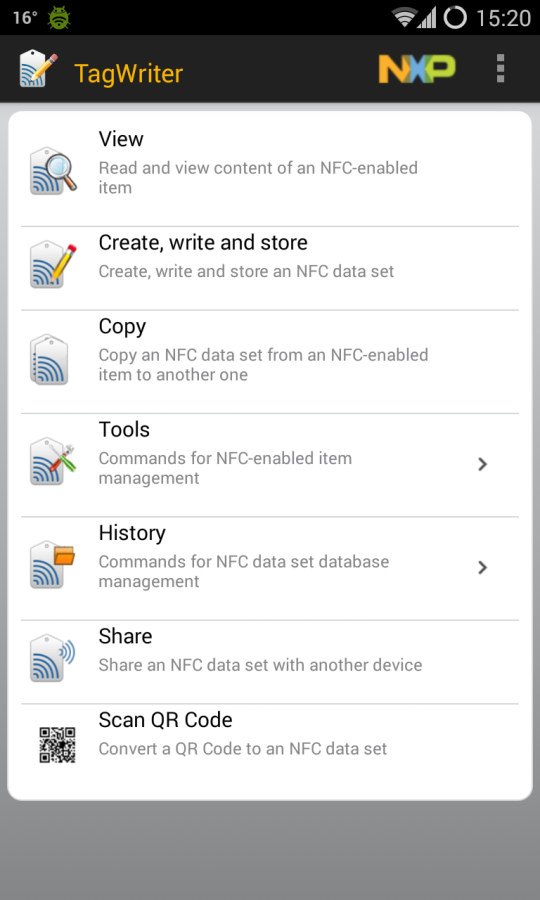
Next, fill in the required fields (for example, the website address in the case of a URI), click Next and get to the options screen (screenshot “NFC TagWriter: message options”). Here you can specify the application that will be launched after reading the label (Add launch application) and set protection to be overwritten by a third-party device (Apply Soft Protection).
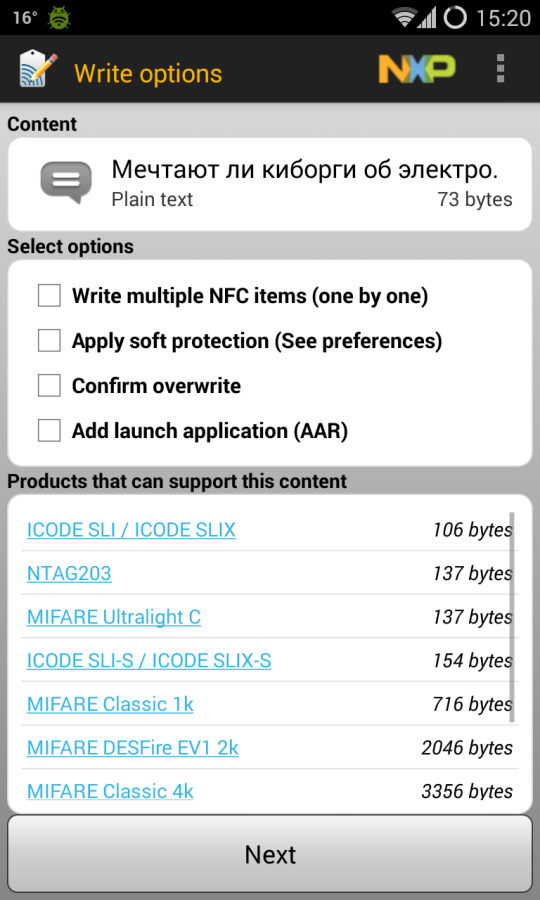
Press Next again and bring the smartphone to the tag. Voila, our data is in it. Now they can be read by any smartphone with NFC support. But what does it ultimately give?
Tags
As mentioned above, the app requires NFC tags to work. They are small sticker devices that store a small amount of information and transmit it to a nearby device. They work from the magnetic field generated by the telephone. This is what makes them “near field” communication devices. They become active only when the magnetic field approaches, which surrounds a small area around the cell.
In general terms, a description of the main principles of operation is presented above. To the above, it should be added that the circuits used for data exchange are tuned to a certain frequency, which allows them to work with maximum efficiency. And the amount of energy received limits the scope of their action to 10 centimeters (often the distance is even less).
Types of tags
Currently, there are 4 types of NFC tags, differing in basic operation parameters. They do not have a specific name, while a brief description of each contains:
- first – 48 bytes of memory and transfer rate up to 106 Kbps;
- second – 2 Kb and transmission level limit – 106 Kb;
- the third stands out with an increase in bandwidth up to 212 Kbps;
- the fourth with a memory of 32 KB and a speed of 424.

To set a task on an NFS tag, you will need:
- turn on the application on the phone to use the technology;
- count the mark by bringing a gadget to it;
- select the action to be taken when a connection is established in the future;
- save the set work pattern.
Advantages and disadvantages of NFC
The main advantages are:
- low price;
- small dimensions of the device;
- high transfer rate;
- support on almost all mobile devices.
It is worth highlighting the cons:
- relatively small range;
- Not all devices are equipped with an NFC chip.
So, thanks to these notes, you have learned quick and easy ways to test your device for the ability to transmit information and interact with other technical means using Near Field Communication. By following the simple instructions in this article, you will also be able to find out for yourself if your smartphone has this technology, you will be able to integrate NFC into your phone and transfer the necessary files at high speed.