 NFC Expert
 1 star
2 stars
3 stars
4 stars
5 stars
As you know, due to sanctions, Honor and Huawei smartphones do not work with Google Pay. But instead of it, you can pay for purchases through the Wallet Pay system. How it works and what difficulties users of anti-American smartphones may face, we understand in the article.
Paying with your smartphone in shops, restaurants, public transport and many other places is fast, convenient and safe. We tell and show how to quickly set up this payment method on your device: we offer you instructions for both iPhone and Android smartphones.
Contactless payment requires your smartphone to support NFC technology. Previously, this feature was available only in expensive devices, but now it can be found even in budget smartphones.
10It is generally accepted that the presence of an NFC module in a device automatically makes it suitable for contactless payments. However, it is not. In order to be able to make purchases using smart watches, you need not only a chip, but also support for a suitable payment system.
Now in Russia, you can use wearable devices with Apple Pay, Google Pay, Samsung Pay, as well as Mi Pay and Garmin Pay to pay. And if you want to buy a smartwatch that can pay, make sure it supports one of the above payment systems. Or just read our article – it contains the most relevant models suitable for payment.
Xiaomi Mi Band is a series of popular fitness bracelets from a Chinese manufacturer. These devices track the wearer’s physical activity, monitor their health, monitor sleep quality and, last but not least, allow them to pay for purchases in stores. Today you will learn which versions of Xiaomi Mi Band support contactless payment technology in Russia, as well as how to set up NFC and add a card.

Why the function might not work
Although the NFC setup is extremely simple, sometimes the function may not work. We understand the reasons and ways to solve them:
- “Failed to activate the card.” If you tried to link the card, but the following message was displayed on the smartphone screen, the reason may be the incorrect localization of the Mi Fit account. In the application settings, change the region to the Russian Federation or Ukraine.
- Pair device first. Another inscription, which is often displayed on the screen. Pair device first translates as “Pair first.” In this case, you need to link the fitness bracelet to your smartphone. If the connection has already been made, then reset the tracker to factory settings and try to connect the gadgets to each other again.
How to set everything up and start paying
In this regard, everything is simple and quite obvious – even those who have not used Google Pay and smartphones with NFC can handle it. However, just adding a card to the application is not enough, you need to associate it with the payment function.
To do this, open the NFC settings (on Android, you can go to them through a long tap on the icon in the curtain) and select “Wallet” as the default application. That’s it – now you can safely put your phone to payment terminals in stores.
All transactions that go through the “Pay Wallet” are stored in the payment history. To open the shopping list, go to your card in the application, tap on the three bars in the upper left corner and select “Transaction History”. Here you can find out the time, amount and name of the company that received the money. In general, the interface is similar to Google Pay.
Although we often criticize modern smartphones, they have made our lives incredibly comfortable. Imagine an ordinary person from the Russian outback just 20 years ago: he might not even have a push-button dialer, and he paid for groceries in the store exclusively in cash, which often fell out of his pocket and spoiled his mood until the next paycheck. Today, every owner of a bank card can pay by phone. To use it, you first need to understand how to set up NFC.
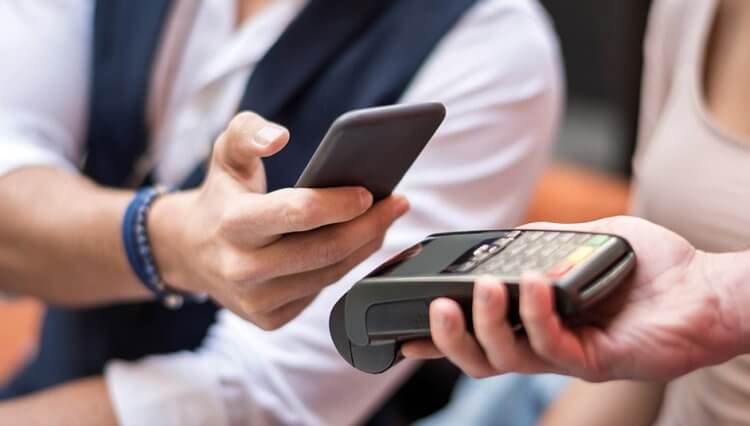
Since 2022, contactless payment via Google Pay has not been working in Russia, so you need to look for workarounds
Wallet app
A couple of months ago, the application began to support bank cards – you can add them manually or by scanning via NFC. Naturally, while observing all the necessary security measures: after entering the payment data, you will receive a message from the bank confirming the linking of the card to the Wallet application. After confirming the addition of the card, it will appear in the list of available ones.
Speaking of security: everything is very serious here (at least at first glance) – the application does not even allow you to take screenshots of windows that contain at least some personal user data.
Every year fitness bracelets (trackers) spread more and not only among sports people. A fitness bracelet with NFC, that is, with support for contactless payment, has gained popularity due to its ease of use.
Fitness bracelets communicate with a smartphone or credit card using the function of sharing location data, notifications, music, cash flow. The last function is responsible for using the bracelet as a credit card. The NFC chip built into the tracker is responsible for contactless payment. Shopping is possible without the use of cards and smartphones.
Today, a bracelet with an NFC chip is produced by technology companies in Europe, the USA and China. In Russia, such gadgets are produced by banks, but they are only capable of contactless transactions with money and are strips of silicone or polyurethane with an implanted chip.
Benefits of an NFC wrist device:
- comfortable in constant wear;
- as a rule, NFC bracelets are not expensive;
- payment for purchases in one movement;
- protected from moisture and dust;
- durable.
- loss of the bracelet will give third parties access to money;
- binding is available for one card.
Many users know how to use Apple Pay on iPhone 6/7, but not everyone connects Apple’s payment service using the same means. The payment mechanism on all iPhones is the same. The setting method may vary slightly. Both use the standard Wallet app available on every iPhone. Optionally, you can activate the payment service on your phone using third-party mobile applications – “Hotels”, “Aeroflot”, “Sberbank Online” and others. In this case, the card is added to Wallet when paying for services or making a purchase, or directly linking the Apple Pay service to the card in a payment application, such as Internet banking.
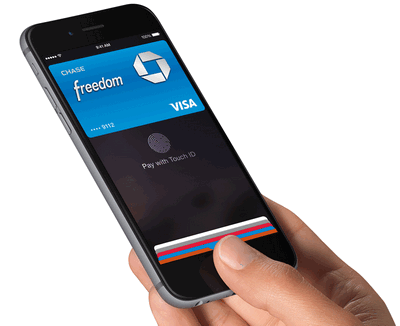
The article will analyze the issues of using Apple Pay on different versions of iPhone, tell you how to enable ApplePay using various methods, what problems arise when adding a bank card in a mobile application.
Apple Pay on iPhone 6/7/X – how to use it and why it doesn’t work
The difference lies in the use of different interfaces of the Apple Watch e-wallet, as well as the binding of the payment card itself. The following advantages distinguish ApplePay from similar payment instruments.
- Practicality. You can leave to forget about the wallet and card and go to the store with one phone.
- Security. Payment data is stored in an embedded chip, encrypted and transferred from the device to the POS terminal only at the time of the transaction. Payment takes place only when the identity of the cardholder is confirmed.
- Profitability. Paying for purchases with Apple Pay, the owner of the device will be able to participate in promotions and earn bonus points to the account.
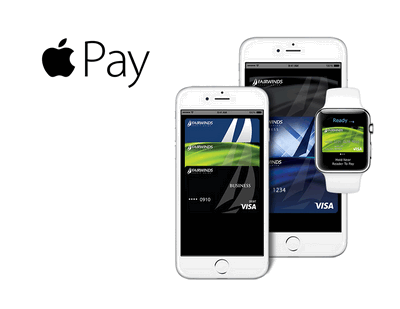
It should be noted which gadgets, plastic cards and credit organizations support Apple’s contactless payment technology. Let’s consider from which “apple” devices you can connect to Apple Pay.
iPhones
Apple Pay technology appeared on the Russian market in 2016. Over the past time, hundreds of thousands of iPhone owners have connected to the system. But many users still ask the question, is there Apple Pay on the iPhone 6/7? The following iPhone models are currently supported by the service:
- 6/6s/6 Plus;
- SE;
- 7/7 Plus;
- 8/8 Plus;
- X/XS/XS Max/XR.
All these phones work fully with Apple Pay. But when you try to use the fifth version of iPhone to buy from its owner, the question arises why the device does not work? The lack of iPhone 5/5c/5s can be explained by the fact that this version of the device does not have a built-in NFC proximity contactless payment module and a special chip that stores data about the payer in encrypted form. But there is one solution to this problem. You’ll need to use an Apple Watch 1st generation or later to link a card in the Watch app. After setting up, the owner of the Watch device will be able to pay for purchases with a smart watch, leaving the iPhone 5 and a bank card at home. To do this, you need to know how to bind “plastic” and connect a payment instrument.
Cards and payment systems
The Company has entered into a cooperation agreement with several payment systems. But not all of their types are supported in Russia. Domestic bank cards work with ApplePay for two types of payment systems.
- “MasterCard”
- “VISA”
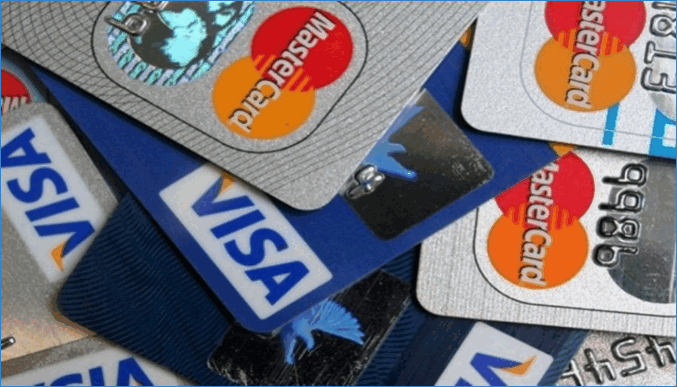
Payment systems MAESTRO, UnionCard, MIR are currently not available to Russian users for integration with Apple Pay. This is due to the reluctance of Western companies to cooperate with Russian banks under the influence of the current economic sanctions. Credit organizations promise that the situation will change for the better. But for now, you can only link, for example, the card of the MIR system to the iPhone for future use. Any owner of this phone will be able to use Apple Pay on the iPhone X. Let’s highlight the types of plastic cards that are available for connecting to the service.
- Debit
- Bonus
- Credit
- Discount (cumulative)
- Corporate
- Family
- Personal
- Identification
- Private
- Payment
This is not a complete list. But in Russia, most plastic cards belong to one of the above types. Therefore, most types of “plastic” are supported. If the user is interested in the question of how to install the Apple Pay application, then this will only require adding a bank card to the Apple Wallet application.
Banks
The major Russian banks listed below work with ApplePay.
Over the three years of integration into the Russian banking sector, it connected almost 90% of financial products to the service.
How to use Apple Pay on iPhone
Apple Pay on iPhone 6 or other device versions is powered by the Apple Wallet system app. All transactions are made according to the same principle, regardless of the iPhone model used or another device, for example, a smart watch. The method of using technology on an iPhone depends on where the payment for the product or service is made. If this is a regular store, and the buyer has, for example, an iPhone 6s with an attached bank card in Wallet, then you can pay for the purchase as follows.
- Press the Touch ID button.
- Bring the smartphone at a distance of about 2-3 cm from the payment terminal.
- The payment technology will find the card to debit funds automatically. Such a card is usually marked with the “Automatic selection” option.
- Hold the device near the POS terminal until a signal appears and “Done” appears on the screen.
If the user wants to select another card for payment from the list in Wallet, then without touching Touch ID, bring the smartphone to the cash register, and then select the desired card on the gadget screen. If the phone freezes after payment, it is recommended to untie the card, re-enter iCloud and re-add the necessary payment details to Wallet.
In the case of a virtual purchase through a mobile application or an online store, it is recommended to use this instruction.

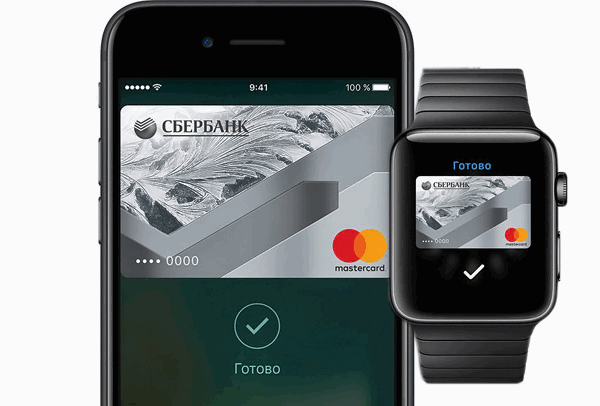
See below for information on how to set up a payment tool to pay for purchases from any iPhone.
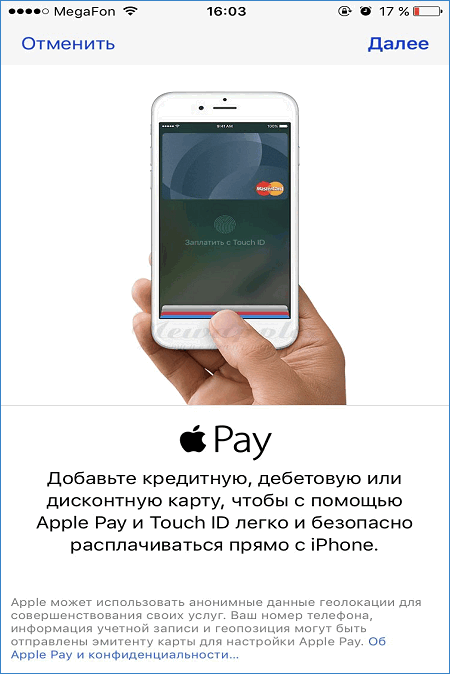
- Then press the image “+”.
- You will need to enter payment and personal data: manually, through other mobile applications or by taking a picture of a bank card with a phone camera.
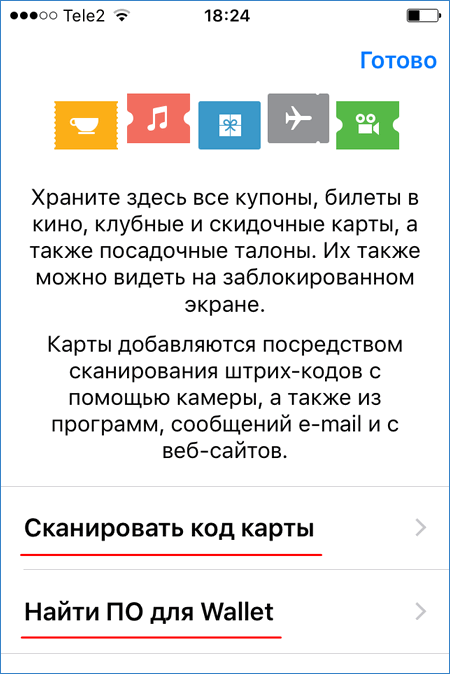
- After filling in the information, enter the security code on the back of the card. We press the continue button.
- Wait for an SMS-notification about the successful linking of the card from the issuing bank or a request for additional information in case of unsuccessful verification.
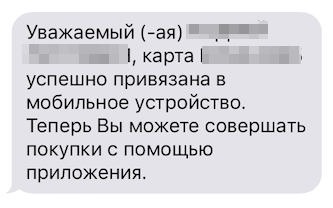
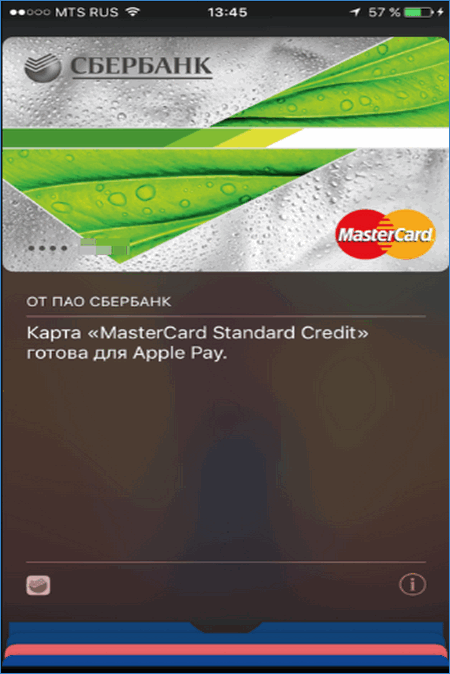
By following these steps, the user will automatically connect Apple Pay to their smartphone. It is enough to go into the wallet program and find the “iPay” icon – a signal that the function has been successfully enabled.
Service features
Using the ApplePay payment method has its own peculiarities.
- Payment is possible if the smartphone has an Internet connection.
- The store has the right to require the payer to additionally enter a pin code or sign the receipt, which is available on the phone screen.
- When the terminal asks you to enter the last four digits of a bank card, you need to go to Wallet, press “i” opposite the line with details and enter the numbers next to the “Device account number” in the appropriate field. This is an alternative to entering a card number.
- When the terminal asks for a choice between a debit card and a credit card, it is recommended to specify a credit card.
Why doesn’t Apple Pay work
There can be several reasons why Apple Pay does not work on the device. Typically, errors are associated with incorrect binding of payment details to the device. In this case, you will need to re-bind using the wallet program. Perhaps the chip containing the payer’s data has stopped working. In such a situation, it is recommended to contact an Apple Authorized Service Center. If Touch ID is not activated on the device, then to connect the functionality:
- go to the “Settings” menu, then the “Touch ID” item;
- enable the checkbox of this feature for the Wallet app.
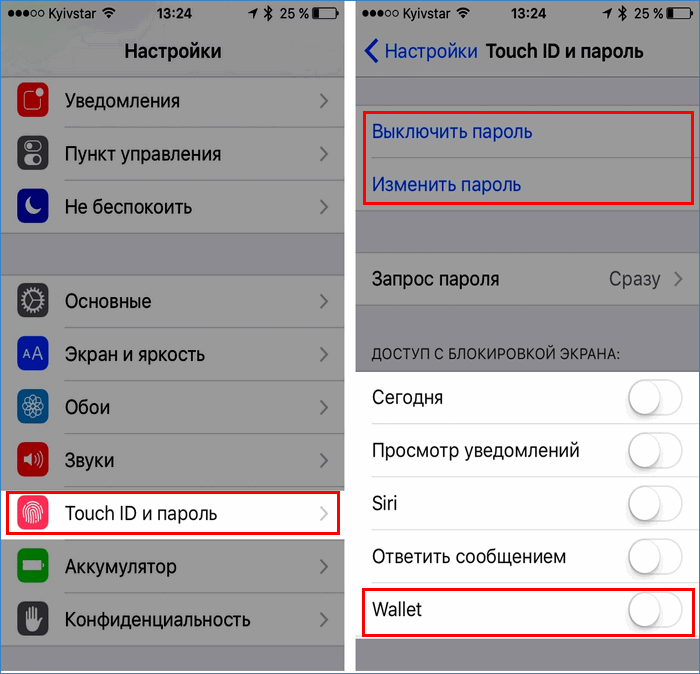
Considering the use of Apple’s contactless payment service for smartphones of this company, any user will be able to quickly pay for purchases. You will need to know the principle of setting up Apple Pay on an iPhone. This was also discussed above. The way Apple Pay works on iPhone 6/7/X and other models differs only in the software interface.
Apple Watch Series 6
Contactless payment is also supported by other Apple Watch models, the most affordable of which is Series 3 costing 17,990 rubles. However, in this article, we decided to focus on the latest version of the Apple Watch Series 6, as it is the most functional.
The watch uses Apple Pay for payments. This is one of the most convenient payment systems – to set up payment, just add a bank card to the application on the iPhone. In addition, Apple Pay supports most credit and debit cards from all major banks.
Also, the sixth series has several new features: a blood oxygen level sensor, updated workouts and now-relevant reminder functions to wash your hands after returning home. The watch even knows how to track the time of washing hands – and if it lasted less than 20 seconds, then it is recommended to continue the procedure.
This year’s budget version, the Apple Watch SE, is quite a bit different from the flagship. So, there is no always-on display function, but inside there is last year’s iron. Also, the model did not receive a pulse oximeter to measure the level of oxygen in the blood.
Apple Watch SE
The SE doesn’t shine with a variety of colors either: they are only available in silver, gold and space gray. Otherwise, the smart watch is not inferior to the older model: there is water protection when diving up to 50 m, a drop sensor and all the standard functions for health monitoring. At the same time, the device costs less – from 24,990 rubles. (Apple Watch Series 6 – from 36,990 rubles.) And yes, you can also pay with these watches, of course.
However, you will need an iPhone to access all the features of any Apple Watch. If you are using an Android smartphone, look at other watch models.
How to pay for the purchase correctly
To pay for a purchase with a fitness bracelet, you need to follow just a couple of steps:
- In the Mi Band menu, find the “Maps” section.
- Select a bank card from which the money will be debited.
- Press the only button on the fitness tracker. The 60 second timer is activated. During this time, bring your wrist to the terminal at a distance of a few centimeters. If you do not have time in a minute, all the above steps will have to be repeated.
- You will hear a successful payment beep (or a text message on the terminal).
Which banks issue NFC bracelets
The NFC smart bracelet has become the focus of attention of banks operating in Russia due to its ease of use. This is a new step in the field of bank payments. Among the pioneers in contactless payments in Russia was Tinkoff Bank. By relying on remote service, Tinkoff has had a major impact on the development of NFC technology in Russia. If desired, a bank client can order a bracelet with an NFC module for a Tinkoff Black or Tinkoff Platinum card.
Alfa-Bank also issues an NFC bracelet for paying by card without the card itself. The wrist device is made of silicone in three colors: red, black and yellow. A mini tag card is inserted inside, it is tied to the account and is responsible for the operation of NFC. A silicone tracker is issued to a bank client when applying for a Next youth card. The client can order it himself by contacting the bank branch.
VTB Bank introduced a series of bracelets for customers in 2016, but abandoned the full implementation of the product.
Sberbank did not stand aside and developed a series of wrist devices. Sberbank was going to present the N FC bracelet in black, white and pink colors. The devices were supposed to be made of silicone and were claimed to be waterproof. Transactions on the bracelet would be limited to verifying the owner. When buying for 1000 rubles or more, the terminal would ask for a password.
How to add a card for payment on Mi Band
To link the card, you will need Mi Fit again:
- Open the app, click on the “Profile” button, and in the “My devices” section, select the name of your fitness tracker.
- On the new page, open the “Bank cards” item. Next, you need to enter your card details. You can specify them manually or scan them using your camera. In the first case, enter the card number, owner’s name, expiration date and secret CVC code on the back of the plastic product. If you are scanning a card, then bring it to the rear camera so that all the numbers are clearly visible.
- Please wait until synchronization is completed. After that, an SMS with a confirmation code will be sent to the cardholder’s phone. Enter it in the appropriate field in the application.
If you didn’t receive a message, try linking the card again in 15-20 minutes.
Settings completed. Now it remains to test the NFS function in the nearest store.
Wallet only supports cards from 40 banks
It will not work to add any card to the application – the program works only with a certain list of banks / Until recently, it only supported Mastercard payment system cards, but now it is possible to connect Visa cards. The owners of “Mir” are still left with a nose, and this is a very large number of people.
As for banks, their list is limited to 40 companies so far, but will be gradually replenished. Among the most famous, which are already supported by Wallet Pay, are Tinkoff, Raiffeisen, Alfa, VTB and Otkritie. Gazprombank and Megafon are expected to join. However, it is still not possible to link Sberbank cards, which we consider a big omission, although understandable – a Russian bank recently launched its own SberPay payment system.
A list of all available banks can be opened directly from the application or on the Wallet website. It also indicates which companies will join the system soon. Be sure to check the current data before you decide to buy a Huawei or Honor smartphone with NFC.
Contactless payment in Russia
If this material had been published a couple of years ago, I would simply say that contactless payment in Russia works the same as in the whole world. But at the beginning of 2023, reservations have to be made. Be that as it may, NFC works in Russia, though not with all cards and not with all applications.
As for the first point, you need a MIR card to make contactless payments by tapping your smartphone to the terminal. Visa and MasterCard systems do not work at the moment. There is an alternative option – payment by QR code, which is gradually gaining popularity in our country. It can be used by holders of any cards, be it Visa, MasterCard or MIR.
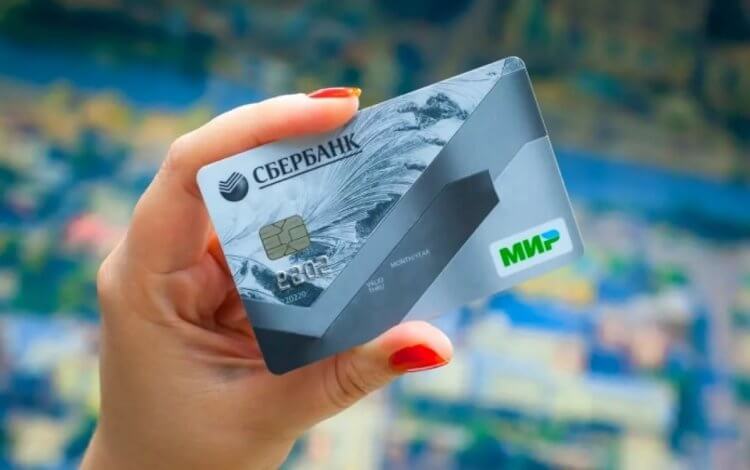
Now NFC payment is available only to holders of MIR cards
Another point is common, it applies to everyone, regardless of their country of residence. The main condition for making contactless payments by tapping your smartphone to the terminal is the presence of an NFC sensor on your device. The NFC Check application will help you check its availability. Run the program and click the “NFC Check” button. We saw a green checkmark and the inscription “Supported” – feel free to proceed with choosing an application for payment.
Fossil Gen 5
The Swiss smart watch Fossil Gen 5 can already be bought on Russian marketplaces. The model uses contactless payment using the Google Pay system, which supports almost all major bank cards.
The gadget has good functionality, relatively affordable price (about 20 thousand rubles) and decent stuffing: Snapdragon Snapdragon Wear 3100 chip, 1 GB of RAM and 8 GB of storage. The device monitors physical activity through the Google Fit app, with the help of a heart rate sensor and GPS.
When using all functions, the smart watch works up to two days, in standby mode – a week. The advantages of the model include wide settings for power consumption modes, and the disadvantages are the lack of a function for monitoring sleep.
Since the devices from our review belong to different price categories, we placed them in the table in ascending order of cost.
Review of fitness bracelets with NFC
The production of wrist fitness devices is often carried out by large high-tech companies to develop the sports segment of smart devices. Improved versions of gadgets enter the market almost every year, our top will help you figure out the innovations.
Xiaomi Mi Band 3
Chinese Xiaomi fitness bracelets count steps, measure heart rate and calories burned, and a smart workout monitoring system captures and analyzes progress. The fitness gadget has a display with a resolution of 138 × 80 pixels, a diagonal of 0.78 inches. The case is waterproof, but it is not recommended to submerge the bracelet in water. The charge will last for 15-20 days depending on the intensity of use. Comes with a charger and a black silicone detachable strap. On sale you can find straps of other designs.
Unfortunately, the software contained in Mi Band 3 and other Xiaomi trackers does not support Google Pay, only Ali Pay is a payment system operating in China, India and other eastern countries, which makes it impossible to use contactless payment in the territory Russia. Users hope that the situation will change in future versions. The price in Russia for Xiaomi Mi Band 3 varies from 2100 to 3000 rubles.
Huawei Honor Band 4
Honor Band 4 contains a pedometer, heart rate monitor, swimming, running and fitness modes, notifications, a smart alarm clock that takes into account sleep phases. The 0.95-inch AMOLED display is so bright that the font is legible even in direct sunlight. Weighs 28 grams, almost not felt on the hand thanks to the silicone strap. Waterproof. The charge is enough for 21 days, but it can be discharged earlier with active use.
The main feature of the tracker is autonomy: in the absence of a smartphone, most functions like a smart alarm clock or exercise control continue to work quietly. The device knows when it is removed from the hand, at such moments it does not waste energy on measuring the pulse or steps.
Honor Band 4, like other models of Honor bracelets, NFC does not support transactions in Russia, which makes it useless as a wrist wallet. The cost ranges from 4000 to 4500 rubles.
Samsung Gear Fit 2
Rugged body, bright vibrant display, fully water resistant, submersible. Heart rate sensor, pedometer, calorie meter, of course, are included in it. But the most attractive functionality is the support for applications that monitor the state of the body, water consumption, and daily activity. The device analyzes the wearer’s lifestyle, giving advice on how to improve it. Routes are provided for running: share your favorite jogging route with others or use the route of another user.
According to the set of functions, the gadget is between a fitness tracker and a smart watch, and therefore it is discharged in 3-4 days. But the short time of work pays off with the ability to respond to messages in the tracker, turn on playlists, and pay for purchases through the NFC module.
Compatible with NFC Android Pay fitness bracelet or Samsung payment app. The price of Gear Fit 2 will be 11,000-12,500 rubles.
The spread of non-cash payments makes people’s cards, accounts and money more and more open, available for making purchases. When using an NFC bracelet, do not forget that this is not just a convenient accessory, but also a wallet, the security of which should be closely monitored.
Samsung Galaxy Watch3
Smart watch Samsung Galaxy Watch3
The Samsung Galaxy Watch3 still has the same recognizable design with a round dial and a beloved bezel. The device is available in two sizes – 41 mm and 45 mm. The larger model has a slightly larger screen compared to the Samsung Galaxy Watch (34mm instead of 33mm).
As far as functionality is concerned, for Russians it remains the same as in its predecessor — there are workouts, automatic sleep measurement, step counting, etc. The new declared functions of taking an ECG and measuring pressure do not work for us.
Is it convenient?
We tested the application on a Huawei smartphone released before the sanctions, so we had the opportunity to compare the work of Google Pay and Wallet Pay. When paying for purchases in stores, there were no problems – all terminals in supermarkets, pharmacies and cafes easily read card information and accepted payments. It seemed that Google Pay worked a little faster, but this is subjective – we did not measure the time.
Another thing is that a bank card linked to the Google system can be used not only to pay for offline purchases, but also for online transfers. For example, you can use Google Pay to pay for orders in many online stores and delivery services, such as Delivery Club. Such a feature does not work with Wallet, and it is unclear whether it will appear in the near future.
In the end, we can conclude this: if you want to buy a new Huawei or Honor smartphone, but at the same time you are worried about the possibility of contactless payment, then don’t worry. With a Mastercard card from one of the “allowed” banks, there will be no problems with payment. But if your phone supports Google Pay, there is no point in switching to Wallet Pay. But using the application for storing store maps is very convenient.

Editor of directions “Mobile devices” and “Home appliances”
Was the article interesting?
NFC operation on Xiaomi Mi Band in Russia
To date, there are only two Xiaomi fitness bracelets with contactless payment technology – Mi Band 4 NFC and Mi Band Smart 6 NFC. What’s more, the latest model with global firmware is not yet on sale. However, as the manufacturer notes, the novelty will soon appear on the market.
At the same time, the Mi Band 5 bracelet, presented at the last presentation, does not support contactless payments in Russia – at the moment the module operates only in China.
Which banks and cards work
Xiaomi cooperates with most major banks in Russia. Mi Band supports maps:
- Alfa-Bank;
- VTB;
- Gazprombank;
- Moscow Credit Bank;
- Bank Post;
- PSB;
- Rosselkhozbank;
- Russian Standard;
- Yandex. Money (renamed YuMoney);
- Tinkoff Bank.
As you may have noticed, Sberbank is not on this list, which is very sad for millions of its cardholders. The number of supported banks is constantly growing, and, according to the latest news, Sberbank is actively working to start cooperation with the Mi Pay system. However, the exact timing of integration is unknown.
Although Sberbank customers cannot link a card to Mi Pay directly, they can apply for a virtual MasterCard card in the YuMoney service. What is it for? Just link your Sberbank card to your YuMoney wallet and transfer money to a virtual card without commissions. Add the latter to Mi Pay and pay for purchases with a fitness bracelet.
Mi Band bracelets work only with MasterCard payment system cards. MIR and Visa cards are not supported.
To use contactless payment on a smart watch, you must first set up the function. There is nothing difficult in this. Just follow the instructions below and follow the recommendations that will pop up on the tracker screen:
- Launch the app, create an account or log into an existing account. When registering, be sure to indicate the region “Russia”.
- After logging into Mi Fit, add your fitness tracker. To do this, open the “Profile” section, then “My devices” and “Add devices”. Select “Wristband” from the category list and follow the prompts on the display.
- Wait for the tracker to sync with your smartphone.
If everything went well, the fitness bracelet will appear in the My Devices section. It remains only to add a map.
Bonuses for users
If you are lucky and the stars align – that is, if you have a Mastercard card from one of the available banks – you will be able to participate in the drawing of prizes from Huawei. To do this, you need to add your card to the application and make a purchase through the Pay Wallet.
It is clear that such promotions are needed to attract new users – but it’s still nice to have the opportunity to win something “just like that.”
What to do if contactless payment does not work
It happens that even after all the settings, NFC payment does not work. Perhaps the problem is related to the location of the sensor or its power. It is usually placed on the side of the camera or below it. In the case, the accuracy of operation for obvious reasons is reduced.
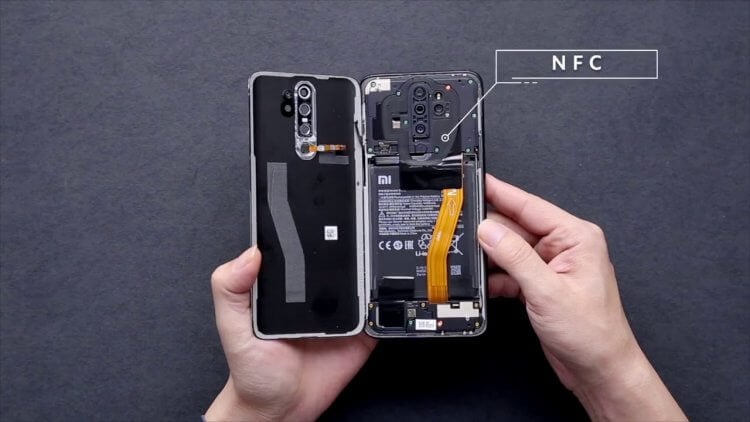
NFC is usually located near the camera unit
In addition, you must make sure that the application for payment is correctly selected, and that the card is valid and has enough funds on it. If still nothing happens, do the following:
- Open the NFC settings on your phone.
- Go to the “Location of the security element” section.
- Select “HCE Wallet”.
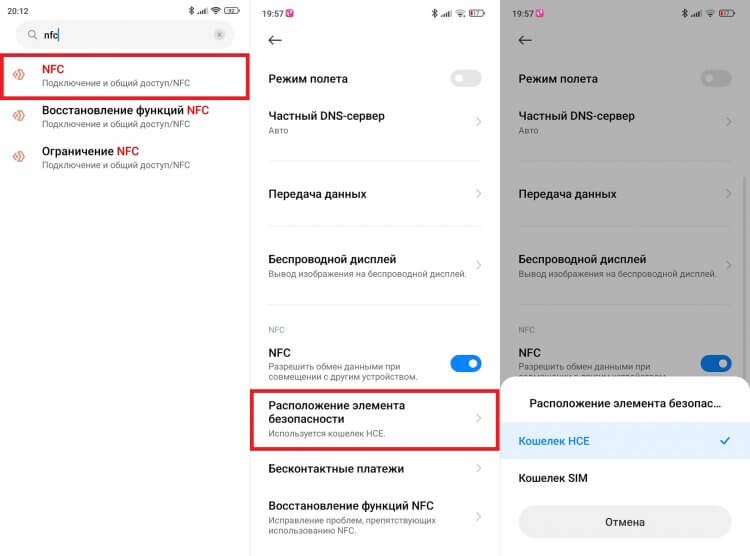
Often, contactless payment works only through the HCE wallet, which does not affect the process in any way
Such manipulations often help out when NFC does not work on Xiaomi. Check if there is something similar in your phone settings. In addition, the device must have an up-to-date version of the payment application. And do not forget that sometimes Mir Pay does not work, for which there are a lot of specific reasons.
NFC payment apps
Since NFC payment is available only to MIR cardholders, the optimal application is Mir Pay. Probably, some of you will remember that the MIR works in Samsung Pay, but I hasten to make a reservation: only on Samsung smartphones that have passed the EAC (PCT) certification. I propose to learn about what Rostest is in a separate article.
Mir Pay is the only app that can replace Google Pay right now
Today Mir Pay is the best NFC payment program, but not the only one. She has an opponent in the face of the SberPay system, which is available in the SberBank application for Android. However, it only works with MIR cards from this bank. All other organizations offer to use either Mir Pay or payment by QR code.
❗ Share your opinion or ask a question in our telegram chat
Video about NFC bracelets
Overview of 10 popular fitness bracelets in 2018:
https://youtube.com/watch?v=XyOElmDatSI%3Ffeature%3Doembed
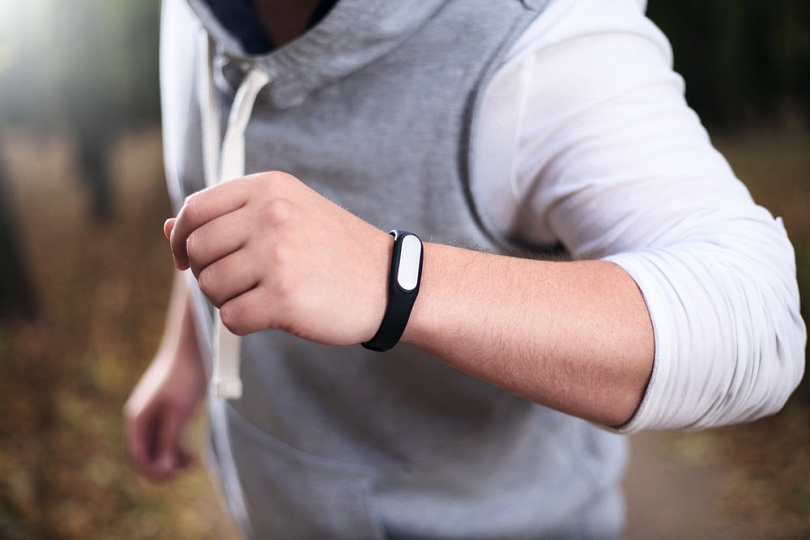
Setting up an NFC wrist device for payment
- In the application settings, find the “Contactless payment” item (in different applications, the line is called differently, but the meaning is the same). Find the line to enter the device ID.
- Enter the tracker app and copy the ID from the device information menu.
- Enter the tracker ID in the bank application field.
- Wait for the message about connecting the account to the bracelet. Fitness bracelet with NFS is ready to use. When paying for purchases in excess of 1000 rubles, password confirmation will be required.
How to get an NFC tracker from Sberbank
NFC bracelets from Sberbank were planned to be released in small batches, but Sberbank refused this project. As of 2019, the wrist device cannot be ordered from a bank. For what reason, an influential financial organization in Russia abandoned bracelets with NFC is unknown. This probably happened due to competition from foreign manufacturers of fitness trackers.
How to set up contactless payment
Now let’s talk about how to make a payment by phone. If you decide to use the Mir Pay service, you will need:
- Launch the Mir Pay application.
- Press the “Start” button, and then – “Add a card”.
- Enter your card details or scan it using the suggested means (camera or via NFC).
- If several cards are added, then do not forget to select the main one.
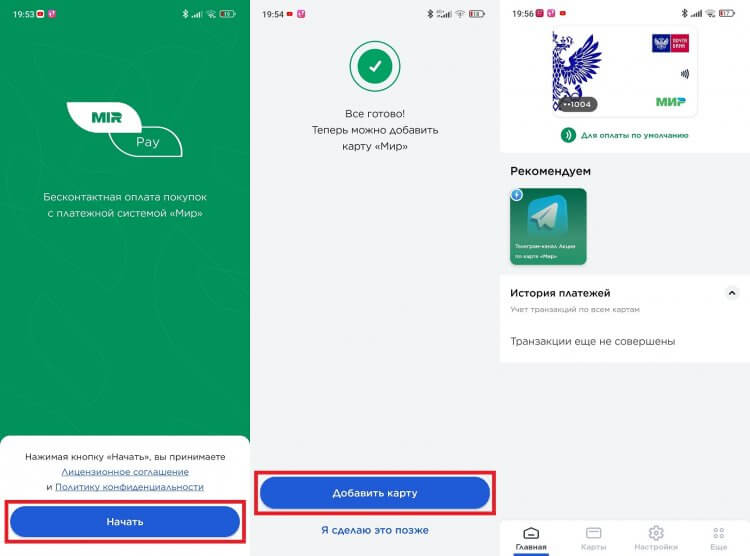
You can add several cards to Mir Pay at once, but only one will be used for payment (switching between cards is allowed)
- Launch the SberBank application.
- In the search box, enter the query “SberPay”.
- Go to the “SberPay – pay by phone” section.
- Click the Connect Card button.
- Select the card that will be used for making payments.
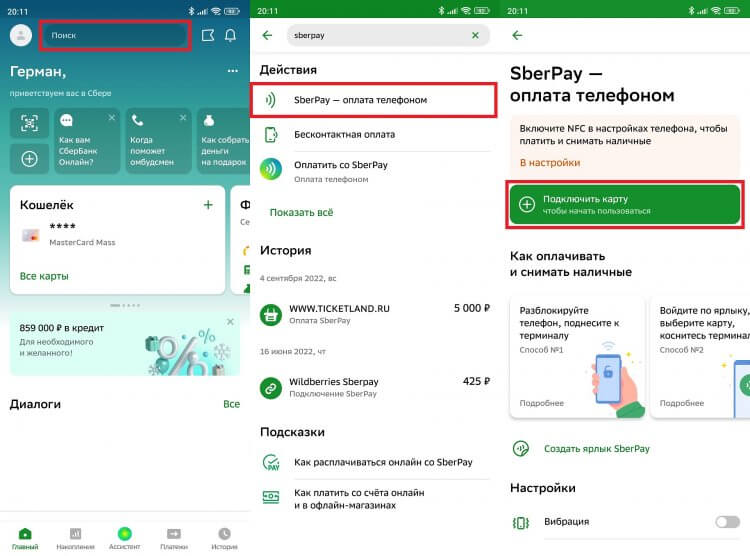
Sber customers who own MIR cards can use the SberPay service
🔥 Check out the telegram channel Ali Baba’s Chest, where we have collected the best products from Aliexpress
- Open device settings.
- Go to the section with NFC settings using the search bar.
- Open the “Contactless payments” tab.
- In the “Payment by default” item, select the desired application.
- Set the value “If no other payment application is open” in the “Use default application” item if you plan to pay with two programs at once.
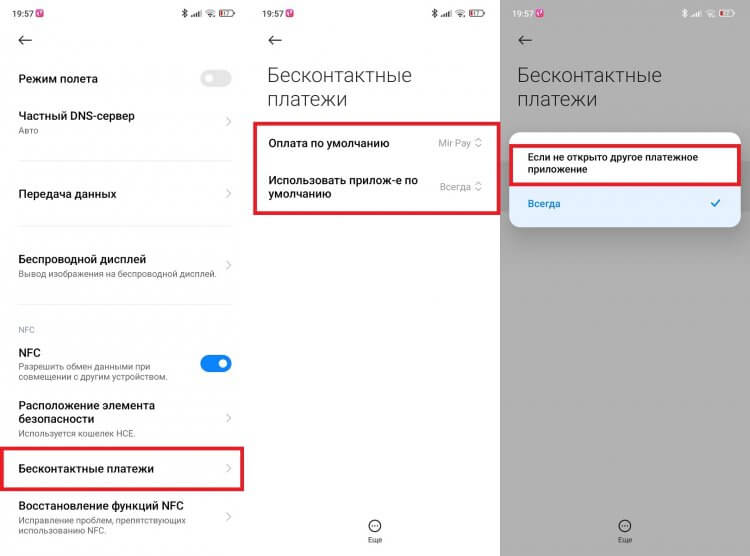
The names of some menu items on your smartphone may differ
This completes the NFC payment setup. And now it’s time to talk about how to pay via phone.
How to set up contactless payment on iPhone
iPhone and Apple Watch users can pay for purchases using Apple Pay. You don’t need to download anything: the Wallet app for adding bank cards is already installed on your Apple smartphone by default.
So, to set up contactless payment on iPhone:
- Open the Wallet app.
- Scan the card or add its details manually.
- Receive the verification code from the bank and enter it in the required field.
- Now your card has been added to the virtual wallet and can be used.
How to pay for purchases and services with Apple Pay
- If the device has Face ID (smartphone unlock system using face recognition) — double-tap the button on the side of the gadget (on the right), pass the Face ID verification and touch the top of the phone to the payment terminal.
- If fingerprint authentication is set, place your finger on the Touch ID scanner (round button) and bring your smartphone to the terminal.
If the operation is successful, a blue checkmark and “Done” will appear on the screen.
You can check whether your smartphone supports NFC technology for contactless payments in your smartphone settings. If your device is less than two years old, it most likely has NFC. If not, then it is profitable to purchase a new gadget – with discounts and cashback – at MTS.
Samsung Galaxy Watch Active2
Like the Galaxy Watch3, last year’s Samsung Galaxy Watch Active2 can send notifications, keep track of the wearer’s activity and sleep, show workout statistics and, of course, allow you to pay for purchases using Samsung Pay. Taking an ECG and measuring pressure is also only “on paper” so far.
Samsung Galaxy Watch Active2
The device is available in two sizes – 40 mm and 44 mm. The design does not differ from the first iteration, only the red bezel of the power button was added. There is still no physical bezel in the watch, it was replaced with a touch one. Of the advantages, users note the Always-On-Display function, fast operation, user-friendly interface and protection against water and dust according to the IP68 standard.
Garmin Quatix 6X Solar
The Garmin Quatix 6X Solar is a nautical smartwatch for sailors, yachtsmen, fishing enthusiasts and other water sports enthusiasts.
The device can be submerged in water to a depth of 100 meters, it also has proprietary marine navigation and support for Fusion acoustics, designed specifically for marine vessels. The model has a built-in solar panel, which allows them to stay afloat longer. Of course, features are also provided for monitoring all major types of physical activity.
Smart watch Garmin Quatix 6X Solar
The device is made of fiber-reinforced polymer, there is a version in a titanium case. The watch is quite weighty – the dimensions are 51 × 51 × 14.9 mm, and the weight is 82 g.
Contactless payment is made using Garmin Pay — this payment system supports Visa and MasterCard cards of all major banks (the list is available on the manufacturer’s website). Other Garmin models also work with this system, such as the more affordable Vivoactive 3 Music with a built-in MP3 player.
How to pay by phone instead of a card
Contactless payment by touching your smartphone is only available if NFC is enabled on your mobile device. It can be activated through the notification shade (control center) or device settings.
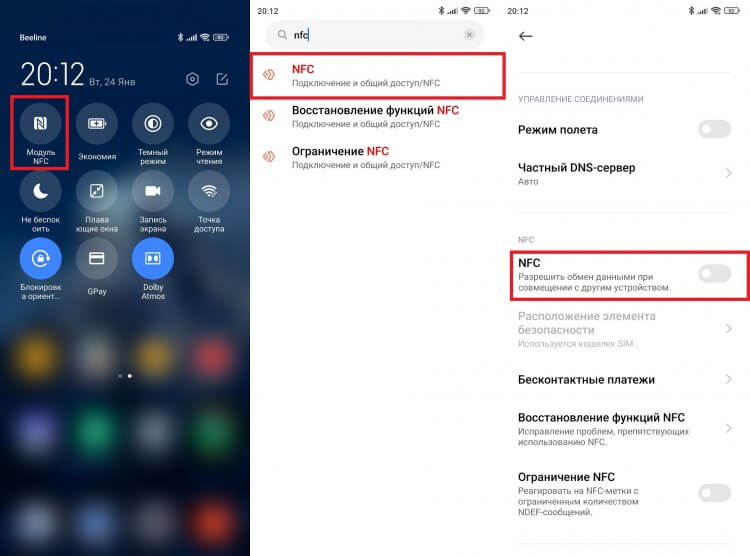
NFC consumes very little power, so you can always keep it on
Now, when you go shopping, just unlock your screen and bring your smartphone up to 10 centimeters away from the back of the payment terminal or touch the device to it. If the purchase amount does not exceed the limit (for example, in Mir Pay it is 3,000 ₽), you do not need to do anything else, the transaction will go through instantly. If the limit is exceeded, you will need to enter the PIN code of the card or put your finger on the fingerprint scanner on your phone.
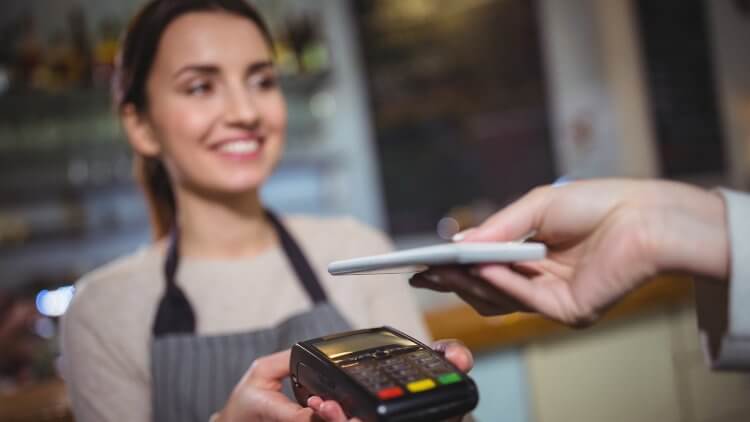
It is not necessary to put the smartphone close, but sometimes NFC does not work at a distance of more than 5 centimeters
Although the smartphone settings offer to select the default application, you can pay with SberPay and Mir Pay at the same time without changing the settings. Make Mir Pay the main means of payment and pay through it by removing the screen lock. In the case of SberPay, before making a transaction, click on the service icon located on the main screen.
The truth about contactless payments in fitness bands
Time to read
Recently, I quite often encounter a misunderstanding of Russian users regarding contactless payments in cheap wearable electronics and the role of the NFC chip in this functionality.
All kinds of news resources play a big role in this, the authors of which thoughtlessly (or on purpose, as a victim of clickbait) copy-paste each other, thinking out interesting tricks. The situation is aggravated with the announcements of new devices, such as Xiaomi Mi Band 4, and news about the imminent arrival of the Xiaomi Mi Pay payment system in Russia, in cooperation with MasterCard.
With this post I would like to dispel the misunderstanding that has developed in Runet on this topic.
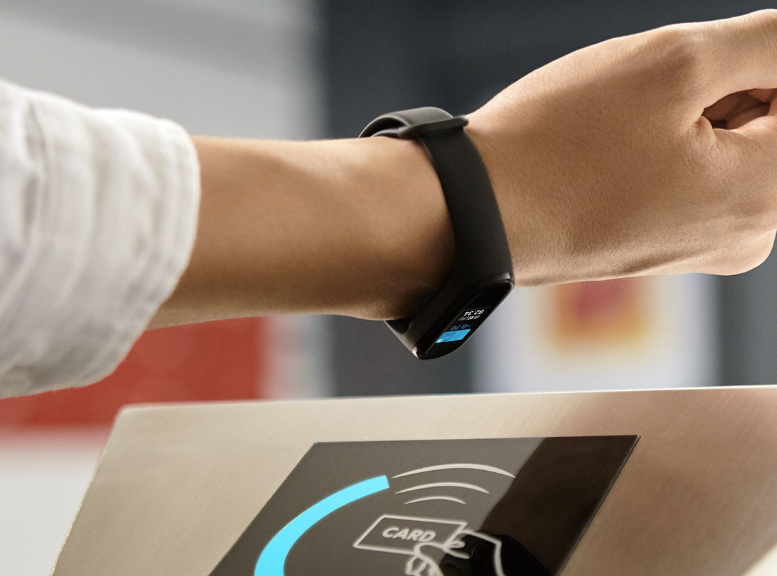
At the moment, contactless payment at the checkout, using NFC, can only be done by a few types of devices:
- Apple Watch with Apple Pay;
- Smart watch based on Google operating system (Android Wear, Wear OS) with Google Pay support;
- Smart watch from Samsung on Tizen OS with Samsung Pay system;
- Smart watch from Garmin with Garmin Pay system; (Thanks, 117 and Kobalt_x, for the tip in the comments)
- Fitbit Pay (not working in Russia) and maybe a few other unpopular options.
In general, there are not so many such devices on the market, and, most importantly, the price for them will be a disadvantage for many when choosing, along with low autonomy.
The vast majority of these gadgets are made in China for the domestic market. Many with subsequent entry into the global market. How are things going with contactless payment in the Chinese domestic market? Two technologies should be distinguished here:
1. Payment via QR or barcode. The Chinese use this implementation everywhere. The point is the following. Almost every user has a smartphone with them. In a smartphone, with a 99.9% probability, “more than just a messenger” WeChat is installed, with its electronic wallet, or the Alipay application is practically an electronic bank from the Alibaba group. There are two ways to pay at the checkout using these applications on your smartphone. Let’s consider them.
1.1 The user scans the merchant’s QR code using the smartphone’s camera. Enters the required amount, or it is already encrypted in the seller’s QR code. Further confirms the transaction (password or biometrics). Money is instantly deducted from the buyer’s wallet in favor of the seller. This method cannot be used on a bracelet due to the lack of a camera.
1.2 The user shows the merchant his QR/barcode generated by the wallet application. The sales clerk beeps him with his hand-held cash register scanner. The amount is also instantly debited in favor of the seller. What does the paying gadget need for this? What he has is a display and some brains. Therefore, this payment method was implemented by Alipay. A supported wearable device is linked to the Alipay app. A separate secure account is created for him in the wallet (with a payment limit). The gadget is assigned and put into it a static pair of codes (QR and bar). Further, the payment takes place offline, without the participation of a smartphone. Transactions are transmitted to the Alipay servers from the store’s checkout. Actually, this is the only method of paying for purchases in a store in China through such devices.
2. Great and mighty NFC. Here we will talk not only about payment, but also about other possibilities of bracelets with an NFC chip. Let’s start, of course, with payments. What comes first here? That’s right, Security. The same mibands cannot provide a sane level of security so that the manufacturer entrusts them with the emulation of bank cards of their users. Maybe the point is the impossibility of reliable authorization of the user. Perhaps in a weak gland. It’s not just that the average fitness bracelet costs at least five times cheaper than the most budget wearable gadget that can fully pay for NFC. This is a separate class of devices in which price and autonomy come first. There is no compromise yet.
But a transport card is another matter. Kilobaks usually do not roll on them and they are not tied to the bank. It’s like pocket change. If you lost it, you just forgot and don’t worry. In some cities, it is even possible to pay for purchases with such a card. This is usually limited to small chain grocery stores like 7-Eleven or FamilyMart. Just the opportunity to buy a conditional bottle of water along the way, which is also the main task of pocket change. Actually, transport cards are one of the main purposes of the NFC chip in miband-like trackers. The point is the following. The manufacturer cooperates with public carriers (metro, city buses). In a proprietary application, in the NFC function section, the user buys a transport card for his bracelet. Virtual, of course, but for a real cost – about 20 yuan (~ 200r) a non-refundable deposit and the rest to the balance (here the amount is at your discretion). The card is recorded in the bracelet and then completely autonomously used to pay for the fare. It is very convenient, since no extra gestures are needed to trigger it, just put your hand to the reader and the payment is made. The card is replenished, just as conveniently, in the bracelet application, using the same WeChat or Alipay, to choose from.
Another feature that accompanies bracelets with an NFC chip is access card emulation. The function is useful and convenient, but, in the same China, in modern realities, it is rather late. I’ll explain why. First, NFC operates at a frequency of 13.56 MHz. Accordingly, only cards with this frequency are supported. Second, it’s safe again. The bracelet can read and correctly emulate only cards without encryption, and as it turned out (thanks to the w3bsit3-dns.com forum), the UID length should be 4 bytes. Otherwise, even if you copy the card, the reader at the checkpoint will not open the door for you. Here manufacturers act differently. For example, the MiFit app will simply prevent you from copying an unsupported card. But the native application of the Hey + bracelet without a twinge of conscience copies everything it can, but does not guarantee correct operation. As practice has shown, such an unsafe intercom or checkpoint in China still needs to be looked for. I did not find.
Things are better in Russia in terms of usability. For example, users of the same forum confirm normal operation with the Moskvenok pass card and with some intercoms.
There is also another interesting possibility – to create a “clean” card, go to the management company and register it in their system. Unfortunately, I was unable to test for a number of reasons. One of them did not leave me a single chance – the same notorious MiFit from Xiaomi asks to confirm my identity using a Chinese ID, which I cannot have, to create such a card. And in general, Chinese security is not dormant. While these features are open for use with the Hey+ wristband, MiFit simply refuses to enable NFC features for accounts registered outside of mainland China.
On this, perhaps, I will finish.
All of the above is based on personal experience and logical conclusions from it.
And the conclusions are as follows: you should not expect the appearance of payment systems in the class of cheap fitness trackers, even with a built-in NFC chip. Even in light of the news about the imminent launch of Mi Pay in Russia. If the same Mi Pay appears in the future on one of the Mi Bands not yet presented, then not before it is tested in China’s native domestic market. And there is no talk about it yet.
I hope this article will be useful to the community, and to the Russian Internet as a whole. Healthy criticism is welcome.
Xiaomi Mi Band 4 NFC
Perhaps the most affordable gadget with support for contactless payment is the Xiaomi Mi Smart Band 4 fitness bracelet. But it is also presented in two versions – with and without NFC. They differ only in the size of the battery (125 mAh in the regular version versus 115 mAh in the version with NFC) and the shape of the icon on the display. The contactless payment model uses the Mi Pay payment system, which was launched in Russia last summer, but began to be actively tested only at the beginning of 2020.
Despite the promise of the developers that the application will work with cards of all banks, for now only MasterCard plastic can be added to Mi Pay. The list of banks is also not very large, and it does not include Sberbank and Alfa-Bank, but they promise to resolve this issue in the near future.
Xiaomi Mi Smart Band 4 NFC fitness bracelet
The device itself has a 0.95-inch AMOLED display with a screen resolution of 240 × 120 pixels, as well as protection against water and dust according to the IP68 standard. The device has a pedometer and a heart rate monitor, and six different training programs are provided for sports. Of the advantages, users also note high autonomy – the tracker will have to be charged no more than once every two weeks.
But the new Mi Band 5 did not receive contactless payment support in Russia – the version with NFC is available only for China.
How to set up contactless payment on an Android smartphone
- Open the “Payment Methods” section in the menu and click on the blue “Add Payment Method” button.
- The scanner window will appear. Place a bank card inside the frame so that the application automatically reads its number, or enter the card details manually.
- Confirm acceptance of the terms of the contract. After that, you will receive an SMS with a six-digit code that you need to enter in the required field.
- Done: your card has been added to Google Pay – you can safely go shopping. By the way, several cards can be added to the payment service at once, indicating which of them will be the main one for settlements.
To complete the transaction, you only need to unlock the smartphone screen and bring the device to the payment terminal. You will need to enter the application only if you want the money to be debited from a card other than the main one. In this case, simply select the desired payment option in the application menu, and then bring your smartphone to the terminal.
Contactless payments using a smartphone are also safe: the payment system reliably protects data and does not transfer it when making a transaction. Thus, no one will know the details of your bank card and will not be able to use them.
Conclusion
Mi Band 4 NFC and Mi Band 6 NFC fitness bracelets are great for contactless payment for goods in Russia. And now you know how to properly set up the function and add a card to an electronic wallet.
Please note that at the time of writing (October 2021), the Mi Band 6 NFC Global tracker is still not on sale. However, the model has been officially announced and should appear on store shelves in the near future.