 NFC Expert
 What “plastic” of Sberbank supports the technology?
In order to pay for the purchase, you need to bring the phone to the reader. It will count the information, withdraw money and print a cash receipt.
But not everything is as simple as it seems. Not every phone and smartphone can make a payment. First of all, the mobile device must have a contactless payment system, which is provided by the built-in NFC function.
https://www.youtube.com/watch?v=https:tv.youtube.com
This means that a special Chip is mounted on the system board of the device that supports the contactless payment option and a special antenna. With its help, data is received and transmitted to special terminals.
How does it work?
In order to make payments, in addition to a phone equipped with an NFC Chip, you must have a bank card. It must support PayPass financial transactions.
To pay, it is enough to unlock the smartphone, bring it to the payment terminal at a distance of no more than 10 centimeters. Enter PIN code to identify the card.
A message about the operation performed will appear on the screen, accompanied by a sound signal. He announces the completion of the banking operation.
Before paying with a mobile device in a store, prepare it for this:
- Check if there is a built-in contactless payment function. To do this, find the NFC function in the settings and activate it;
- After that, it is determined whether the plastic card can perform these operations. Almost all banks issue cards that provide remote payments. If there is no such function, you should contact the bank to reissue the card;
- A special application is installed on a mobile device via the Internet. It is individual for each type of smartphone – Apple Pay, Android Pay, Samsung Pay. In addition to these programs, there are other software developments that allow you to pay for purchases;
- After starting the application, scan the card data using the camera. You can enter them yourself – 16-digit card number, CSV code and expiration date;
- An SMS message with a code will be sent to your phone. It must be entered to complete the binding of the card to the phone.
Before paying, the phone is unlocked with a key. It can be a numeric value, a fingerprint, or a pattern. Put your smartphone into standby mode.

Select the card from which funds will be debited. The user can link several cards to one smartphone. If only one card is linked, then nothing needs to be selected. Bring to the terminal, payment will occur automatically.
To perform an operation to pay for purchases in stores, pharmacies, etc. devices that have a special hardware device are needed. This is the Chip and the built-in antenna.
They allow you to pay for purchases in merchants equipped with scanning devices with the PayPass function.
Today, such mobile devices are produced under the brands:
- iPhone (iPhone);
- Samsung (Samsung);
- Xiaomi (Xiaomi);
- Honor (Honor);
- Huawei (Huawei);
- Asus.
All devices are equipped with a module that allows you to use contactless payments. Devices running Android software must be configured accordingly.
Why activate the NFC function in the phone. A special program is downloaded. After installation, which enters the parameters of a bank card. The device can make payments.
In order for your smartphone to be able to transfer data from a payment card to a POS terminal, it must have an NFC module installed. It transmits an encoded signal within a radius of no more than 10 cm. If the recipient device is also equipped with a similar module, they can exchange contacts, geotags and links with each other. This process is similar to Bluetooth pairing, but there is a significant difference between these technologies:
- The Bluetooth range is up to 100 meters. In this regard, NFC wins significantly, as it practically reduces the risk of data interception to zero.
- Pairing between the NFC signal source and the recipient occurs automatically in a fraction of a second. For a Bluetooth connection, you need to find the desired device, send a request with a password to it, accept it and confirm the connection.
- NFC puts minimal strain on your device’s battery. The included Bluetooth module constantly scans a vast area of space around itself and because of this, intensively discharges the battery.
- Communication via NFC is much slower than via Bluetooth. So, for sending photos, videos or audio files, “sinezub” is more suitable.

Ultimately, both technologies complement each other’s capabilities. Through Bluetooth, you transfer large files from smartphone to smartphone, and with the help of NFC, you make secure payments.
Contactless payment is not the only application of NFC technology. With its help, you can read information from special tags, similar to how a QR code is scanned. And the peer-to-peer mode allows you to exchange data between two paired devices, for example, if you need to transfer the Wi-Fi router settings to a smartphone.
The Sberbank contactless bank card is in a sense a standard card, but it has a special technology built into it. With its help, you can make quick purchases, the amount of which does not exceed the mark of 1000 rubles (otherwise you need to enter a secret code).
The plastic contains an NFC chip (Near Field Communication, translated as “near field communication”), it transmits information about the past payment to the bank via radio channels.
To actively use this innovation, it is necessary to have a device that can receive radio signals. Therefore, you can pay with an NFC card only in places where POS-terminals are installed.
Paying with a contactless card has a distinctive feature: to make a purchase, you do not need to put the card in an outdated terminal and dial a PIN code, you just need to attach it to the reader.
Step-by-step instructions for the payment procedure:
- Check if the displayed amount is correct.
- Touch the card to the reading POS terminal.
- Wait until the message “Approved” is displayed on the screen and a characteristic beep sounds.
- Remove the card.
Today, contactless payment for purchases can be made in any shopping center, fitness club, supermarket, cafe or restaurant. And in a number of large cities in Russia, using this card, you can pay for a ticket by installing the Troika application, which is available on both Android and iPhone.

The NFC card of Sberbank is rapidly gaining popularity in the Russian market due to a number of significant advantages.
Among them:
- Comfort. It is convenient to use the cards, since there is no need to insert them into the terminals, it is enough just to attach them to a special device. It is noteworthy that they do not even have to get out of a wallet or business card holder. This helps when making payments when your hands are busy with all kinds of packages.
- Simplicity. Now there is no need to remember PIN codes and constantly enter them. To make a purchase, you just need to take your card with you and apply it to the terminal.
- Instant payment processing. Any monetary transactions are carried out very quickly, without taking precious time from the owner of the debit card.
- Reducing technical errors. Non-contact technology keeps you safe: since the plastic is no longer in direct contact with the terminals, the possibility of degaussing the black magnetic strip is reduced. The service life is increased.
- Security. By making a one-touch payment, you can protect your card details from illegal photo and reader devices used by scammers.
Major flaws
Although contactless cards have a number of undeniable advantages, they also have disadvantages:
- Inability to use. Creating maps is not difficult, but not all terminals are able to support them. This is the main circumstance preventing the mass distribution of contactless programs and technologies.
- Limit. To protect customers, special payment limits have been introduced, above which it is impossible to pay with a card. This is due to the fact that the system cannot guarantee absolute protection against hackers and intruders. There have been precedents when, using homemade RFID readers, scammers stole money from people. Therefore, this security option cannot be disabled.
If the attackers manage to steal the means of payment, they will be able to safely make purchases that do not exceed 1000 rubles, since this does not require a secret code.
Now Sberbank is reissuing and offering new customers to become owners of Mastercard or Visa contactless payment cards. Also, not so long ago, an alternative appeared to pay with a Mir Sberbank contactless card, which are also equipped with this technology.
The following types of Visa cards exist:
- Visa Classic. A classic visa has a basic set of options, the cost of the first year of use is 900 rubles, then it decreases to 600 rubles.
- Visa Gold from Aeroflot of two types: debit and credit. Its peculiarity is the ability to receive bonus miles, which can later be paid off by buying tickets from Aeroflot and SkyTeam companies. You can issue it at any branch of the bank, and one thousand welcome miles will be immediately credited to your account. Maintenance costs 3500 rubles / year. The owners of these cards also have access to a variety of discount programs from the World of Privilege. Credit limit – 600 thousand rubles.
- Visa Platinum. It opens access to the services of Sberbank Premier, many pleasant bonuses are provided.
- “Give life.” Within the framework of this program, a fixed share of the purchases made is transferred to the charitable account of an organization that provides material assistance and support to children with oncology. Annual service – 15 thousand rubles for the first calendar year, then reduced to 10 thousand rubles a year. The cardholder enjoys any benefits and bonuses: enhanced protection against fraudsters, insurance program, extended warranty period, support abroad and other privileges.
What is a contactless payment method
Not all people understand what a contactless payment method means. The term refers to the calculation without the direct use of the card.
To do this, “plastic” is brought to the terminal, after which the required amount will be debited from the bank account.
Google Pay, Apple Pay and Samsung Pay
An NFC chip alone is not enough to pay for purchases using a smartphone. The second key condition is the presence on the device of a special payment system in the form of an application. For several years of development of contactless payment technology, three leaders have been identified:
- Google Pay;
- Apple Pay;
- Samsung Pay.
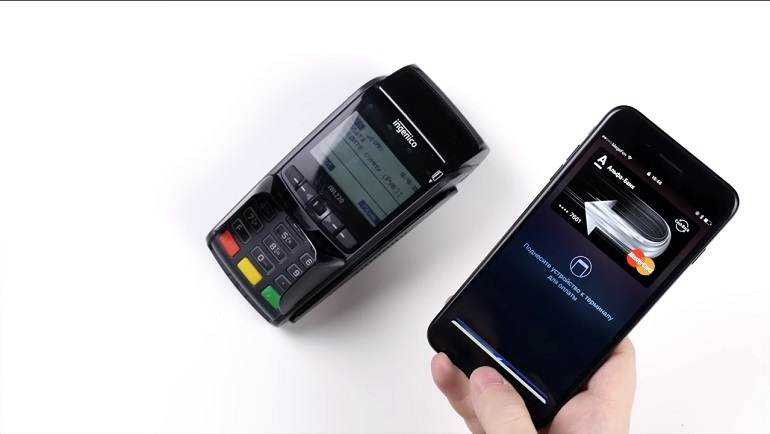
These systems are united by a common principle of operation. You enter your card details into the application: number, username, expiration date and three-digit CVV2. The payment system translates them into a so-called token – a digital code, in other words, creates a virtual card. The token is stored on an NFC chip and is protected by a complex encryption algorithm.
The main convenience of such systems is that you can add any type of cards to one application:
- credit or debit;
- accumulative or bonus;
- an electronic key to a house or office;
- transport pass;
- pass to the pool, gym or nightclub.
Mobile payment systems can be used for purchases in online stores. Instead of entering card details every time, you just need to click on the appropriate button in the payment section of the website or application.
Let’s figure out how payment systems differ from each other:
- Smartphone model with NFC. Apple Pay and Samsung Pay only work on their branded smartphones. The advantage of Google Pay is the ability to install the application on any smartphone that runs on the Android OS, starting from version 4.4 KitKat.
- Confirmation of payment. Apple Pay and Samsung Pay have two-step verification. First you need to unlock your smartphone with your fingerprint, PIN code, face recognition or retina recognition. By the same methods you confirm the purchase. In the case of Google Pay, it is enough just to unblock the gadget, and the payment itself does not need to be re-verified.
- Receiving devices. Google Pay and Apple Pay only work with terminals that are equipped with a signal receiver from an NFC chip. Samsung Pay has a wider range of applications here. The South Korean payment system has implemented a proprietary technology that generates an electromagnetic field on magnetic tape terminals without NFC. Thus, the device perceives a signal from a smartphone, as if you were swiping a real card across the terminal.
PayPass and PayWave cards
A natural question arises, what are their differences? It all depends on the payment system: Mastercard, Visa, Mir.
PayWave technology is used in Visa and Mir payment systems. On plastic, it is indicated as an inscription or a radio signal symbol. As for PayPass, it is used only in MasterCard.
Contactless payments can also be made with credit cards. There are no significant differences in the technologies used.
Contactless payment via smartphone
Another innovative offer of Sberbank for its customers is the ability to make payments using a smartphone. Thanks to this innovation, you do not need to take an outdated plastic card everywhere. The role of the payment instrument will be performed by the phone. For transactions, the same NFC technology is used, which is based on the principles of radio communication with a certain coverage area.
To pay bills by phone, you need:
- The gadget had an NFC chip;
- A special app has been installed;
- Reading devices were installed at the place of payment.
https://www.youtube.com/watch?v=ytpolicyandsafety
The algorithm of the procedure is as follows: the smartphone is brought to the device and wait until the transaction is completed. As a rule, the exchange of information between the bank and the terminal takes place instantly, it does not take more than 1-2 seconds.
You can find out if your smartphone supports NFC technology on your own. Check its case or battery: if they show the NFC icon (wave icon), then the technology is supported. Also, you can “dig” in the settings, and determine.
The following contactless systems currently operate in Russia:
- Sumsung Pay. This system is supported by 6 phone models, which is an absolute record (other developers cannot boast of such an abundance of contractors). The pricing policy of companies that support this technology is quite democratic, smartphones can be purchased at a reasonable cost. Also, the application has a magnetic stripe image, which makes it possible to use it in standard terminals.
- Apple Pay. Sberbank is the first and only Russian bank to cooperate with Apple. The application is supported exclusively by original flagship smartphones, starting from the sixth version (Apple Iphone 6). No more than 4 devices can be linked to the system, a scanned fingerprint is required for operation.
- Android Pay – this payment system is developed by Google and is built into gadgets based on Android. Among the advantages are: a wide variety of partner banks; automatic binding of accumulative and discount cards; opportunity to participate in bonus programs.

All systems are similar in terms of functionality, transaction methods and security system. The setup algorithm is the same: you need to install the application corresponding to the phone model; switch the NFC module in the settings to active mode.
Contactless payment via cards or smartphones still seems to be something incredible and untrustworthy. A certain proportion of Russians is skeptical about innovative technology, but this distrust is gradually subsiding, and perhaps in the near future this payment method will be firmly entrenched in everyday life.
Benefits of paying with a mobile device include:
- Usability;
- There is no need to carry a plastic card all the time;
- Security of the transaction;
- Constant control of the account status;
- The impossibility of withdrawing funds without your participation;
- Ability to manage and pay from different accounts with one device;
- If necessary, you can quickly disable the data transfer function. There is no need to apply to a financial institution.
Like all systems, it also has drawbacks. These include the relative complexity of management. This applies to older people. In addition, if the mobile device is dead, it will be impossible to make a purchase.
Technological progress forces people to master new technologies. Until recently, many did not know how to pay by phone instead of a card. Now this is part of everyday life.
The only thing to pay attention to. This is for the purchase of modern equipment, without which it is impossible to make payments. Select the appropriate application and connect it to your mobile device.
How to use
To understand how to use contactless cards, you should apply for and receive them from your bank. When the “plastic” is on hand, you can go to the store, pharmacy or other outlet for shopping. Approaching the contactless payment terminal, you must:
- Check the collected amount by the cashier.
- Bring the “plastic” to the reader at a distance of 10 cm or attach it to the terminal with either side. There is no need to enter a PIN code.
- After 2-3 seconds, funds will be debited from the account. As confirmation, a beep will be made and an inscription on the screen.
About a year ago Mir cards appeared in Russia. They are also equipped with PayWave technology. The principle of use, as with other cards. Their only limitation is the firmware on the terminal. This means that not all devices can work with this “plastic” in non-contact mode.
How to apply the card to the terminal
https://www.youtube.com/watch?v=ytabout
In general, the procedure for using such plastic is quite clear, but sometimes customers have questions about which side to apply the card for contactless payment and whether it is possible to use the card in a particular terminal. The second point is easy enough to define. The equipment must be marked with waves, which indicates the availability of contactless payment. In addition, logos of card types can be placed on the device.
It should be said that recently the opportunity to make contactless transfers using the Mir card from Sberbank has become available.
It is very easy to pay for purchases in a contactless manner. To do this, just follow the following instructions:
- Check the amount of purchases and if it is less than 1000 rubles, use the contactless payment option.
- Bring the plastic to the terminal, but do not touch it. You can leave a distance of 3-5 cm.
- After a few seconds, a sound will come from the equipment, indicating that the payment is being made.
To pay with a card with an NFC chip, you need a terminal that can read NFC signals. To understand if such a function is in the device, you need to inspect it. The place where you need to apply the card can be indicated by a special icon in the upper part of the terminal body.
Contactless Payment Sign
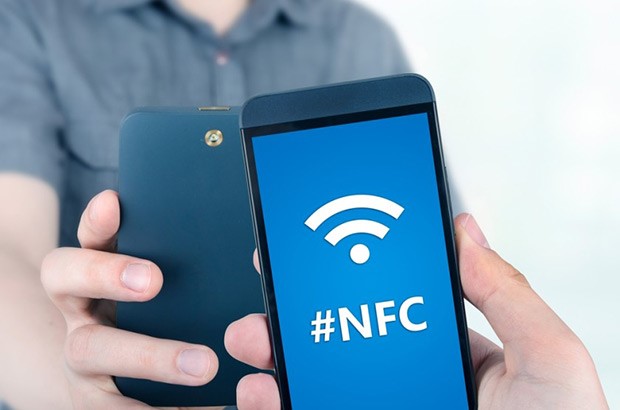
Some models are not labelled, but support contactless payment. A marking that confirms this possibility can be applied on the back of the device – the abbreviation CLESS next to the serial number – or located in the battery compartment.
A blinking green LED at the top of the device screen is also one of the signs of a contactless chip in the terminal. If it blinks gray, then the terminal supports the contactless method, but it is not activated. In this case, you should contact the company that sold the terminal – a service or a bank – for help with the setup.
A card with an NFC chip shows a contactless payment symbol, there are inscriptions Mastercard Paypass or Visa Paywave.
To make a payment, you just need to bring the card to the terminal with the side marked. The operation takes a second. Usually, purchases up to 1,000 rubles are not confirmed by entering a pin code, it depends on the card settings. Operations above the set limit require standard confirmation.
At what distance from the terminal does the card work? The card is triggered at a distance of 2–3 centimeters from the terminal. This is for the safety of customers. Fraudsters using special scanners do not have the opportunity to get card data while standing in line behind the buyer.
There are terminals with the ability to pay by phone. A smartphone or other device equipped with the NFC system is linked to a current bank card through the bank’s mobile application. They pay for purchases with a phone in the same way as with a card: just bring the phone with the back to the terminal.
The smartphone is applied close to the terminal and held for 2-3 seconds. The fact that the payment has passed will be indicated by a sound signal and a flashing green flag on the phone display.
The NFC module is required for Android Pay or Apple Pay payments. Smartphone apps will not only help you pay, they will also tell you which stores and companies in the city use terminals that support contactless payments.
How does it work?
Manufacturers install a contactless data transmission system on modern mobile devices. It allows you to accept money, pay for purchases, transfer information to another device.
This system operates at a short distance – no more than 10 cm. To ensure the operability of devices, software developers have released a number of applications.
They, with some exceptions, have a similar algorithm of work. However, they have both advantages and disadvantages.
The Google Pay app has been specially designed for Android devices with NFS system. The program is installed by the smartphone manufacturer. If it is not on the phone, it is downloaded from Google Play.

To activate the payment system you need:
- NFC-enabled smartphone with Android software. The version must be at least 5.0;
- The user must create an account on Google Play;
- If the application is not installed, it is downloaded. Open and sign in to your Google account. It is added automatically during authorization;
- In the lower right corner, the “ ” icon is pressed;
- In the menu that opens, add a map. You can take a picture of it or enter the parameters yourself;
- The bank sends a password via SMS to identify the card. It must be entered in order to make purchases.
After correctly entering all the operations, the user can use the smartphone to pay for the goods. In this case, it is necessary to ensure that the receiving terminal has a sign displaying the logo of the payment system.
https://www.youtube.com/watch?v=https:mIPkdzT_Gr4
Modern iPhones use the Apple Pay system in conjunction with the Wallet application. Up to eight plastic cards can be connected to iPhone. The list of banks with which the system cooperates is constantly expanding.
To activate the NFC function, you need:
- iPhone 6 or later;
- Modern version of iOS software;
- Apple ID;
- The Wallet app opens. It comes with the device. Press the “Add card” button;
- Enter data – number, expiration date, owner’s name. You can just take a picture of it;
- The data is sent to the bank for verification. After checking, click the “Next” button.
The gadget setup operation is completed. You can make purchases and use your iPhone for payments.
Samsung has developed an application for its phone models. It is unique and cannot be used on other brands.
In addition to NFC technology, it is equipped with a magnetic stripe-on-card payment function. It is the only system that provides this functionality.
Its activation is as follows:
- Launch Samsung Pay and log into your account;
- Set up a suitable authorization method. It can be a fingerprint or a PIN code;
- Before adding a card, click on the “ ” sign;
- Enter the data of the plastic card;
- The system’s request for consent to the terms is answered with approval;
- After checking the data by the bank, you will receive an SMS with a confirmation code. It is entered in the appropriate line.
The phone is ready for use. After the purchase, the user needs to bring it to the reader, and the money will be debited from the buyer’s account.
The user can connect up to 10 magnetic cards to the smartphone.
To pay for purchases, services or make other contactless payments, you can use Yandex. Money. Additional applications, programs are not required.
You only need to update the Yandex. Money up to the latest version. Set up the Contactless Payments application. The application itself will generate a virtual MasterCard card.
On the account, which will be the amount equal to the balance on the electronic wallet. Pin-code will be sent via SMS. After that, payment by phone instead of a card for services and purchases will be available. In this case, no commission is charged for transactions.
If a user has an electronic account in the QIWI system, the question arises of how to pay by phone instead of a card for any purchases. In this case, the user must have a smartphone with the NFS function.
Android software version 4.4 or higher is installed on the device. That should not be a problem in calculations.
This operation became possible after the joint development of Visa and QIWI Wallet.
These technologies raise questions from users. How secure is the system. Is it safe to make payments using the phone.

There is no reason to be afraid of fraudulent schemes:
- The user can check the status of the account via the Internet at any time;
- Payment is made only with an unlocked communication device;
- Data exchange takes place in the immediate vicinity of the reader and telephone;
- You can turn off the NFC data transfer system at any time;
- All account information is encrypted;
- Payments over RUB 1,000 require buyer confirmation;
- It is not possible to withdraw funds from the account twice. As soon as the payment has passed, the device turns off;
- Completed payment ends with a sound signal.
https://www.youtube.com/watch?v=ytadvertise
Modern mobile devices cannot be unlocked by an intruder. Therefore, even a lost device does not pose a danger to stealing money.
To pay with a chip card, you need a terminal that reads RFID signals. How the card will be applied (along, across, back or front side) does not matter. R FID-chip transmits a signal at a distance of up to 10 cm, so the information is read 2-3 cm from the terminal. It is necessary to apply the card in order to obtain a stable signal and exclude interruption of the operation.
To determine where to put the card, you need to pay attention to the terminal or pinpad. The place to which the card is applied can be indicated by a special sign (inverted Wi-Fi), which is located either on the terminal itself or on the pinpad. Some models are marked on the back of the device or in the battery compartment, so you can check with the seller for information. Another indication of the presence of an RFID chip is a green blinking LED at the top of the terminal.
Safe use of NFC
Bank representatives claim that a contactless card with PayWave or PayPass technology is safer than cash storage. To protect yourself from scammers you need to:
- set a limit on the number of non-contact transactions;
- lower the threshold for the amount requiring confirmation by entering a pin code.
Samsung and Apple Pay have no restrictions. This is because the service requires additional authentication through a passcode or fingerprint.

Despite the security of the technology, there is a possibility that the credit card will be stolen. In this case, fraudsters will be able to purchase goods in the amount of up to 999 rubles.
For security reasons, it is recommended to connect mobile banking. In this case, after each purchase, an SMS notification will be sent to the smartphone about the debited amount. Thanks to this, it is possible to notice the theft of money in a timely manner.
Contactless card data can be read from a distance of 2-3 centimeters. Fraudsters take advantage of this and use a special scanner to steal card data through clothing in public transport, on the subway escalator or in line. To prevent this from happening, experts advise storing the card in an unusual place – in a bag or backpack, in the inside pocket of a jacket or coat. Another solution is a wallet or purse with shielding. He will save you from bandits.
Setting up NFC for card payment
To use wireless payments on your mobile device, you need to set up NFC. For devices running Android, required:
- Open smartphone menu.
- Click the settings icon.
- Select “Wireless & Networks”.
- Scroll to the bottom of the screen, and then click on the inscription: “More”.
- Find NFC and Android Beam function.
- Allow data transfer.
- In the Android Beam line, enable activation (automatic).
Advantages of contactless cards
It’s fast. Money is debited from the card in a second. This saves time for sellers who can serve buyers faster. Cards and terminals with contactless payment are convenient where there is a large flow of customers and the speed of service is important – at gas stations, in transport, bistros.
No need to enter a pin code and give the card to the cashier. Information about the card will not be stolen with the help of a special overlay – a skimmer.
The card does not wear out. It happens that the validity period of the card has not yet expired, and the magnetic tape is worn out from frequent scanning in stores and the data is not read. You need to go to the bank, wait in line to the operator, just finding time for this is inconvenient. Cards with a contactless payment chip work longer than regular ones.
https://www.youtube.com/watch?v=ytdev
Prevalence. Most shops, hotels and catering establishments in Europe accept contactless payments and paying by card or phone eliminates language problems while traveling.
Advantages and disadvantages of contactless payments
Before you start using contactless payment methods, you need to familiarize yourself with the advantages and disadvantages of NFC.

Pluses include:
- the ability to pay without a password (up to 999 rubles);
- fast transaction execution;
- work of the functional in 30 countries of the world;
- reduction of wear of the magnetic tape on the “credit card”;
- there is no need to hand over the “plastic” to the cashier.
Also, it can be attributed to the advantages that it does not matter which side to apply the “credit card” to the terminal.
Unfortunately, there are also disadvantages of using contactless payment methods:
- NFC technology is not supported by all mobile devices;
- scammers purchase goods worth up to 999 rubles. without entering a password;
- This payment method does not work in provincial cities.
https://www.youtube.com/watch?v=ytpress
With the help of contactless payment with cards, time is saved for shopping. Thanks to this, you do not need to remember the PIN code. Of course, this is the case if a product worth up to 1000 rubles is purchased. To protect yourself from scammers, it is best to use Google (Android) or Apple Pay, as these applications allow you to protect the “plastic” with a fingerprint.